
Sesame
A local-first, open-source password manager for Windows and Linux with 2FA and security checks
Gallery
About Sesame
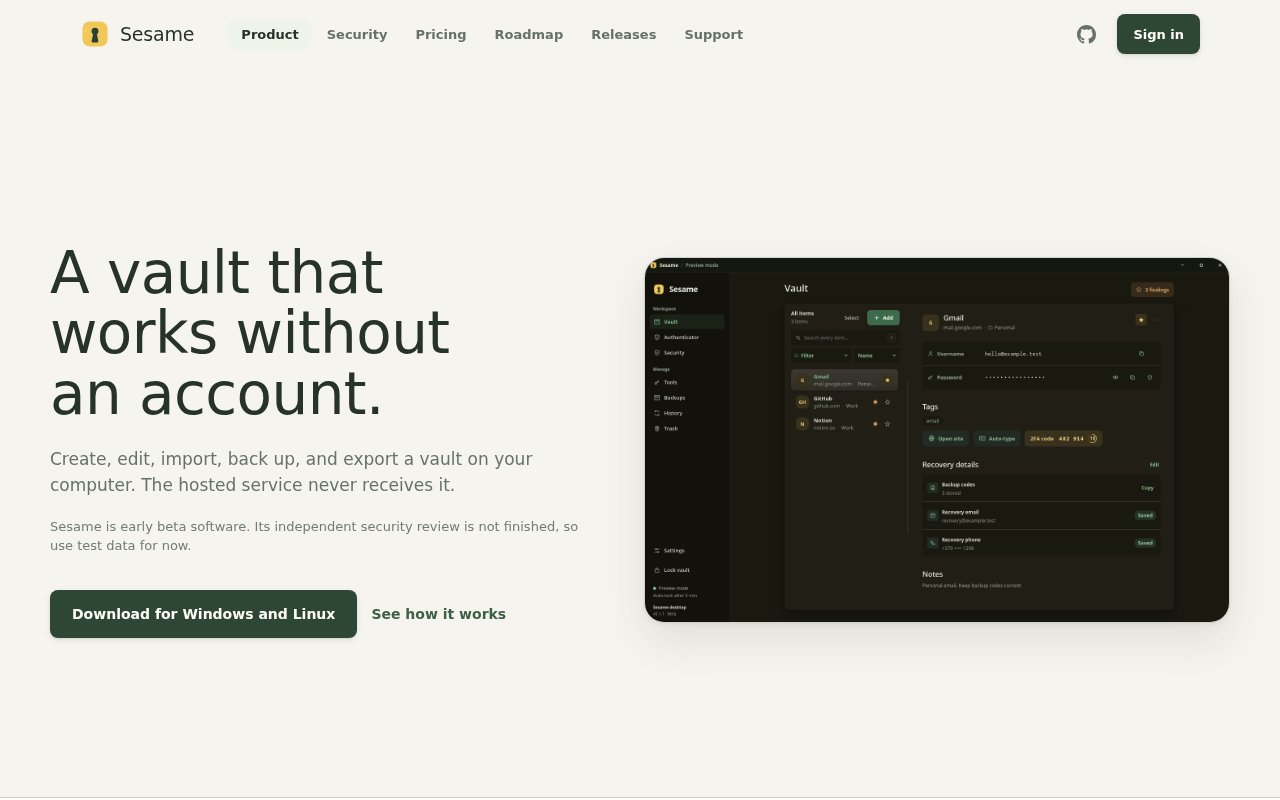
Sesame is an open-source password manager for Windows and Linux that keeps your logins, two-factor codes, security checks and backups in one desktop app. It's local-first by design. The vault and the master password stay on your machine, and the hosted service never receives them. It's in public beta, and the makers are unusually open about what's finished and what isn't, which is worth more than polish for a tool that holds your credentials.
The reason it exists is that desktop password managers tend to split into two camps. On one side sits the mature but dated feel of something like KeePassXC, on the other the hosted convenience of Bitwarden and its peers, where your vault lives on someone else's server by default. Sesame is trying for a current desktop experience without giving up the local model, which means a modern app that still treats your vault as a file you own and can back up, export or move.
Day to day you unlock the vault with a PIN or Windows Hello, search for a login, copy the credential, and generate the 2FA code in the same window. It imports from fifteen password manager formats, so moving over doesn't mean retyping, runs security checks over what you've stored to surface weak and reused passwords, and can back up and export the vault whenever you like. A browser extension for Chrome, Edge and Firefox exists but isn't in the extension stores yet, so for now it installs by hand.
It's for people who want a password manager they can inspect and, later, self-host, and who are comfortable being early. The desktop app is written in Rust and the server in Go, all four repositories are public under AGPL-3.0-or-later, and self-hosting the server is an option. What's not there yet matters as much as what is. Sync, mobile apps, passkeys, sharing and emergency access are all listed as not yet available, so today it's a single-device tool.
The honest posture is the differentiator. The makers say the independent security review isn't complete and recommend test data only for now, which is the right thing to say about a beta password manager and rarer than it should be. Only the website account credentials and product information go to Sesame's servers, everything sensitive stays where it was created.
The limits are the platform list and the beta itself. There's no macOS build and no mobile app yet, there's no way to sync between machines, and until the security review lands you shouldn't move your real vault in. If you need sharing or emergency access today, it's not there.
Getting started means creating a website account, which covers signed downloads and device management, downloading the desktop app for Windows or Linux, and either creating a vault from scratch or importing one of the fifteen supported formats. The security checks are worth running straight after an import, since that's when a decade of reused passwords tends to surface. The browser extension for Chrome, Edge and Firefox has to be installed manually for now because it isn't in the stores yet, so autofill takes a few extra minutes to set up.
Against the established options the positioning is specific. KeePassXC gives you the local model with a long track record and an older interface. Bitwarden and the hosted managers give you sync and mobile apps in exchange for keeping your vault on their servers. Sesame wants the local model with a modern desktop app, and eventually a paid hosted sync you can choose or self-host, but today the sync, mobile and sharing pieces are missing. The right way to read it is as a promising beta from a team that publishes its code under AGPL and tells you plainly not to trust it with real data until the review is done. Watching the four repositories is the best way to see when sync, mobile and the security review land.
The data model is simple to reason about. The vault file and the master password never leave the device, backups and exports are yours to keep wherever you like, and unlocking with a PIN or Windows Hello is a convenience layered on top rather than a replacement for the master password. Only the website account credentials and product information are sent to Sesame's servers, and self-hosting the Go server is an option for anyone who would rather not send even that.
Access is free to download and use locally. A website account covers signed downloads and device management, and a paid tier is planned for hosted sync once that ships. If you want a modern local vault and don't mind being early, it's worth a look with throwaway data, and the public repositories let you check the claims yourself.
Key Features
- Local vault, nothing sensitive leaves the device
- Built-in 2FA code generation
- Imports from fifteen password manager formats
- Security checks over stored logins
- PIN and Windows Hello unlock
- Browser extension for Chrome, Edge, and Firefox
Pros & Cons
What we like
- Vault and master password never touch the hosted service
- Fully open source under AGPL with self-hosting
- Modern desktop app with imports from the usual suspects
- Candid about beta status and missing features
Room for improvement
- Windows and Linux only, no macOS or mobile yet
- No sync, passkeys, sharing, or emergency access yet
- Independent security review not complete, test data advised
- Browser extension installs manually for now
Frequently Asked Questions
What is Sesame?
Is Sesame free?
Is Sesame safe to use today?
Does Sesame sync between devices?
Best For
Featured in
Alternatives to Sesame
View all
1Password
Password and secrets manager for individuals, families, and developer teams with strong CLI and SSH agent support.
Clerk
Drop-in authentication and user management for modern apps

Tailscale
WireGuard-based mesh VPN that connects your devices, servers, and cloud resources into one private network in minutes.

BackPedal
UK bike theft protection that sends recovery agents after your stolen bike
Our take
Tool Index Editorial · Oct 2026· 2.5/5
Sesame is a free, open source password vault for Windows and Linux with local imports, two factor codes, backups, and checks for weak credentials. The vault works without an account or network connection, and the project publishes installer hashes and build evidence. Planned hosted sync is priced at EUR 1 monthly or EUR 10 yearly, but it is not available yet.
We respect the unusually direct warning on the homepage. Sesame is an early beta, has not completed an independent security audit, and tells users to use test data only. That means it should not hold a real password collection today. There is also no mobile or macOS app, sync, passkey support, sharing, or emergency access. The transparent engineering is encouraging, but a password manager has to be judged by what is safe now, not by its roadmap.
Editorial opinion from the Tool Index team, written from the public product pages. Not a user review.
Reviews (0)
Badge builder
Add Sesame to your website
Choose a badge style and size, preview it here, then copy the generated HTML. Badge images are self-contained SVGs and do not require an external script.

<a href="https://toolindex.net/tools/sesame?ref=badge" target="_blank" rel="noopener">
  <img src="https://toolindex.net/badge/sesame/medium.svg" alt="Sesame - Listed on Tool Index" width="180" height="50" />
</a>How to use the badge
- 1. Pick the style, size, and theme that fit your layout.
- 2. Copy the generated HTML from the code block.
- 3. Paste it into your footer, homepage, or press page.
Standard badge available
The standard listing badge is available now. Score and circle badges are limited to tools currently ranked in the top 10 of a category.
Badge clicks return visitors to this profile with a referral tag so the source remains identifiable.
Related Tools
Clerk
Drop-in authentication and user management for modern apps

DomeSOC
Autonomous SOC that grades every AI claim against evidence before it reaches an analyst
Reel
Forensic evidence capture for regulated Kubernetes, plus a free open-source VEX hub

HeimWall
Menu bar app that catches secrets and PII before you paste them into AI coding tools
Work on Sesame? Request listing access or correction