
Slopsift
Local NLP linter that catches AI writing patterns through dependency parsing
Gallery
About Slopsift
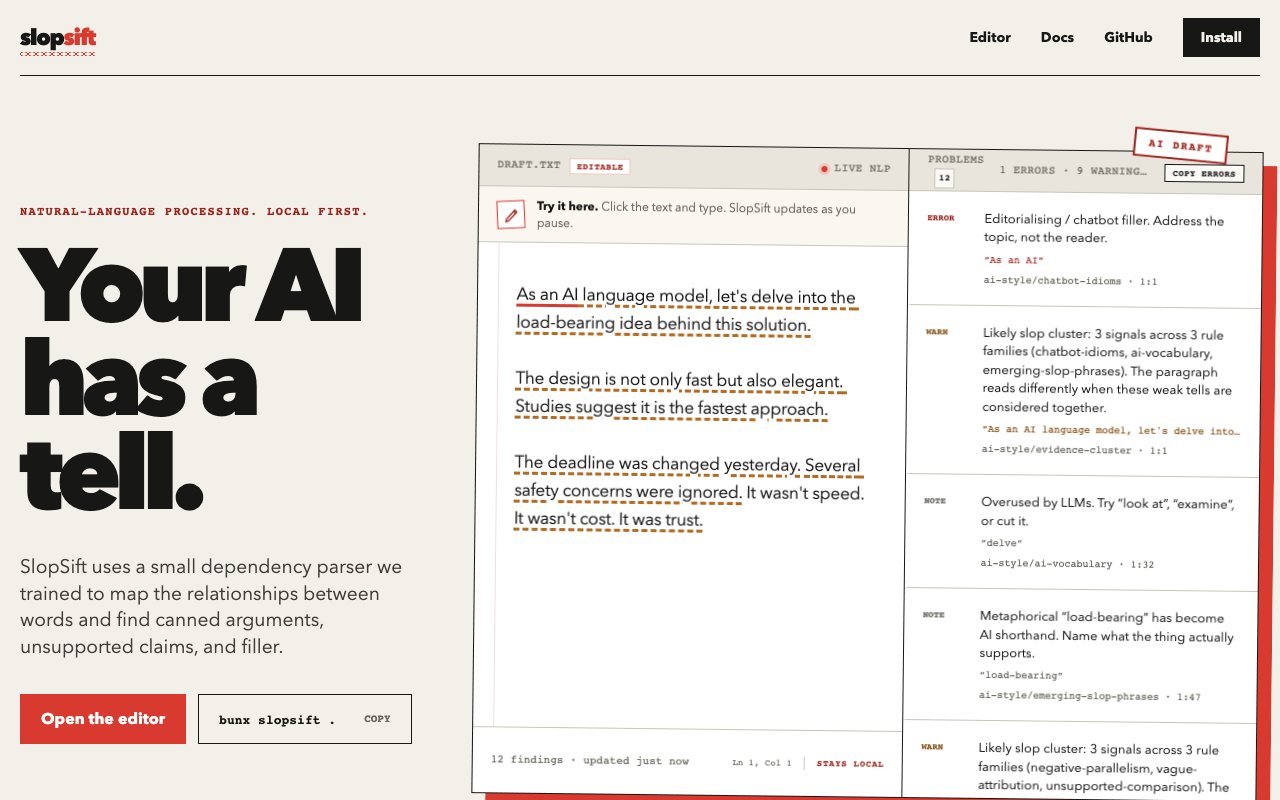
SlopSift catches the recognizable patterns that mark AI-generated writing before anyone else notices them. The tool scans Markdown, prose, HTML, and source code comments looking for grammatical structures and phrasing habits that show up frequently in content produced by language models. It's not claiming to prove who wrote something, and the creators make this limitation explicit right on the homepage. What it does is flag the stylistic tells that make readers suspicious or that editors have learned to spot. For writers polishing drafts, developers reviewing documentation, or editors screening submissions, SlopSift offers a way to spot and address these patterns before publishing rather than getting called out after the fact. The analysis runs locally on your machine using a lightweight dependency parser, so there's no sending content to external servers for evaluation and no data leaving your environment.
The detection approach relies on rule-based checks rather than machine learning models. Each rule has a name you can look up, making the process transparent rather than a black box verdict that offers no explanation. When SlopSift flags a passage, you can see exactly which pattern triggered it and why that pattern is considered characteristic of AI output. Maybe it's an overused transition phrase that language models reach for constantly, a particular sentence structure they favor, hedge words appearing with suspicious frequency, or opening patterns that recur across model outputs. This transparency lets you make informed decisions about what to revise rather than blindly accepting or ignoring a score you can't interpret. The deterministic nature also means running the same text twice produces the same results, unlike probabilistic AI detectors that sometimes flip their verdicts on identical content depending on random factors in their evaluation.
There are multiple ways to use SlopSift depending on your workflow and technical comfort. A browser-based editor on the website lets you paste text and get immediate feedback without installing anything or creating an account. You can experiment with it right away to see how your writing fares. For developers who want to integrate detection into their build process, content pipeline, or editorial tooling, there's an npm package available for direct installation. The entire codebase sits on GitHub under an open-source license, so you can inspect the rules in detail, understand exactly what patterns get flagged and why, suggest improvements based on your observations, or fork it for custom needs specific to your domain. Documentation walks through installation and configuration for those embedding it in larger systems where automated checking makes sense.
The target audience includes anyone producing or reviewing written content who cares about authenticity or wants to improve their style. Writers using AI assistance for drafts might run their work through SlopSift to identify sections that read too generically and need a personal touch or stronger voice. Documentation teams can screen technical writing before it ships, catching patterns that undermine reader trust in instructional content. Publishers and educators reviewing submissions get a first-pass filter for material that might warrant closer inspection or questions to the author. Content marketers can check copy before it goes live. Because the tool processes everything locally, sensitive or proprietary content never leaves your environment, making it safe to use with confidential material. There's no account to create, no data leaving your machine, no usage logging, and no ongoing subscription to maintain.
SlopSift explicitly avoids making claims about authorship determination, and this honest framing matters for how you use the results appropriately. Finding patterns associated with AI writing doesn't mean a human didn't write it since humans absolutely can and do use these same patterns. Absence of those patterns doesn't guarantee authenticity either since skilled users can prompt AI to avoid common tells. What you get is a practical editing tool that highlights stylistic characteristics worth reconsidering, not a forensic verdict you'd want to make accusations based on. This realistic positioning makes it more useful for its intended purpose of improving writing quality rather than policing authorship, which is a different and much harder problem. The focus stays on actionable feedback you can actually apply to make your text better rather than generating controversy you can't back up.
The tool fills a gap between ignoring AI writing patterns entirely and relying on opaque commercial detectors with questionable accuracy that produce scores without explanations. By keeping rules named and inspectable, processing local, and expectations realistic about what it can and cannot determine, SlopSift offers a lightweight way to check content without the drama that surrounds AI detection tools in general. Whether you're cleaning up your own drafts that started from AI prompts, screening incoming content from freelancers, or just curious about what patterns appear in your natural writing, having a transparent pass at common AI writing habits beats catching them after publication when readers call it out in comments or social media threads.
Key Features
- Dependency parsing for structural analysis
- 16 MiB local ONNX model
- Three-tier confidence levels
- ESLint-style JSON output
- Browser and CLI execution
- Explainable detection with text ranges
Pros & Cons
What we like
- Runs entirely on-device with no cloud uploads
- Explains every detection with exact reasons
- Integrates into CI workflows via JSON output
- Catches patterns regardless of who wrote them
Room for improvement
- Focused on English prose patterns only
- Smaller model may miss subtler issues
- Requires some technical setup to integrate
- Younger project with a smaller community
Frequently Asked Questions
What is Slopsift?
Is Slopsift free?
Does Slopsift detect if text was written by AI?
Does Slopsift send my text to a server?
Best For
Featured in
Alternatives to Slopsift
View all
Frase
AI-assisted SEO content tool that turns SERP research into briefs, outlines, and optimized drafts inside one editor.

Confluence
Atlassian's long-running team wiki that anchors many enterprise knowledge stacks

Lunchbreak AI
Run text through six AI detectors at once, then humanize whatever gets flagged

ChatGPT
AI assistant for conversation and content generation
Reviews (11)
Decent with some rough edges
Picked Slopsift for the price, stayed for the quality. What stands out is how it handles explains every detection with exact reasons. My only gripe is younger project with a smaller community. Glad I made the switch.
Recommended without reservation
Hadn't planned on switching, but Slopsift was hard to ignore. What stands out is how it handles runs entirely on-device with no cloud uploads. The core workflow is smooth once you are set up. Worth it for what I get out of it.
Does the job, a few gripes
Tried Slopsift on a side project first, then rolled it out everywhere. The defaults are sensible, so I was not fighting settings on day one. Performance has been steady even when I lean on it hard. Mostly using it for cleaning up passive voice and filler in drafts. My only gripe is focused on english prose patterns only. No regrets so far.
Finally something that fits
Hadn't planned on switching, but Slopsift was hard to ignore. The defaults are sensible, so I was not fighting settings on day one. It just works, day after day, without surprises. Found it works best for cleaning up passive voice and filler in drafts. No regrets so far.
Exactly what I needed
Picked Slopsift for the price, stayed for the quality. The 16 mib local onnx model is more useful than I expected. The interface stays out of my way, which I appreciate. Found it works best for automating prose quality checks in ci pipelines. Easy yes for anyone weighing the same trade offs.
It just works
Three months of Slopsift later, here is what holds up. The defaults are sensible, so I was not fighting settings on day one. It has shaved real time off my week. Found it works best for linting ai-generated documentation before shipping. It earns its place in my stack.
Genuinely impressed
Started using Slopsift casually, now it is pinned in my dock. Where it really wins is three-tier confidence levels. Worth it for what I get out of it.
It just works
Came to Slopsift after getting frustrated with what I had before. Performance has been steady even when I lean on it hard.
Solid daily driver
Found Slopsift on a Show HN thread and I am glad I clicked. The catches patterns regardless of who wrote them is more useful than I expected. Mostly using it for linting ai-generated documentation before shipping. Glad I made the switch.
Quietly excellent
Came to Slopsift after getting frustrated with what I had before. The integrates into ci workflows via json output is more useful than I expected. No regrets so far.
Exactly what I needed
Started using Slopsift casually, now it is pinned in my dock. What stands out is how it handles 16 mib local onnx model. It earns its place in my stack.
Badge builder
Add Slopsift to your website
Choose a badge style and size, preview it here, then copy the generated HTML. Badge images are self-contained SVGs and do not require an external script.

<a href="https://toolindex.net/tools/slopsift?ref=badge" target="_blank" rel="noopener">
  <img src="https://toolindex.net/badge/slopsift/medium.svg" alt="Slopsift - Listed on Tool Index" width="180" height="50" />
</a>How to use the badge
- 1. Pick the style, size, and theme that fit your layout.
- 2. Copy the generated HTML from the code block.
- 3. Paste it into your footer, homepage, or press page.
Standard badge available
The standard listing badge is available now. Score and circle badges are limited to tools currently ranked in the top 10 of a category.
Badge clicks return visitors to this profile with a referral tag so the source remains identifiable.
Related Tools
Confluence
Atlassian's long-running team wiki that anchors many enterprise knowledge stacks

SoloDevStack
A solo developer blog built on head-to-head tool comparisons, 580+ posts deep.

Logseq
An open-source outliner notes app where every bullet is a first-class block

Bear
A beautiful Markdown notes app for Apple devices that doubles as a writing tool
Work on Slopsift? Request listing access or correction