
Transcribe.Free
Free audio and video to text transcription in 90+ languages
Gallery
About Transcribe.Free
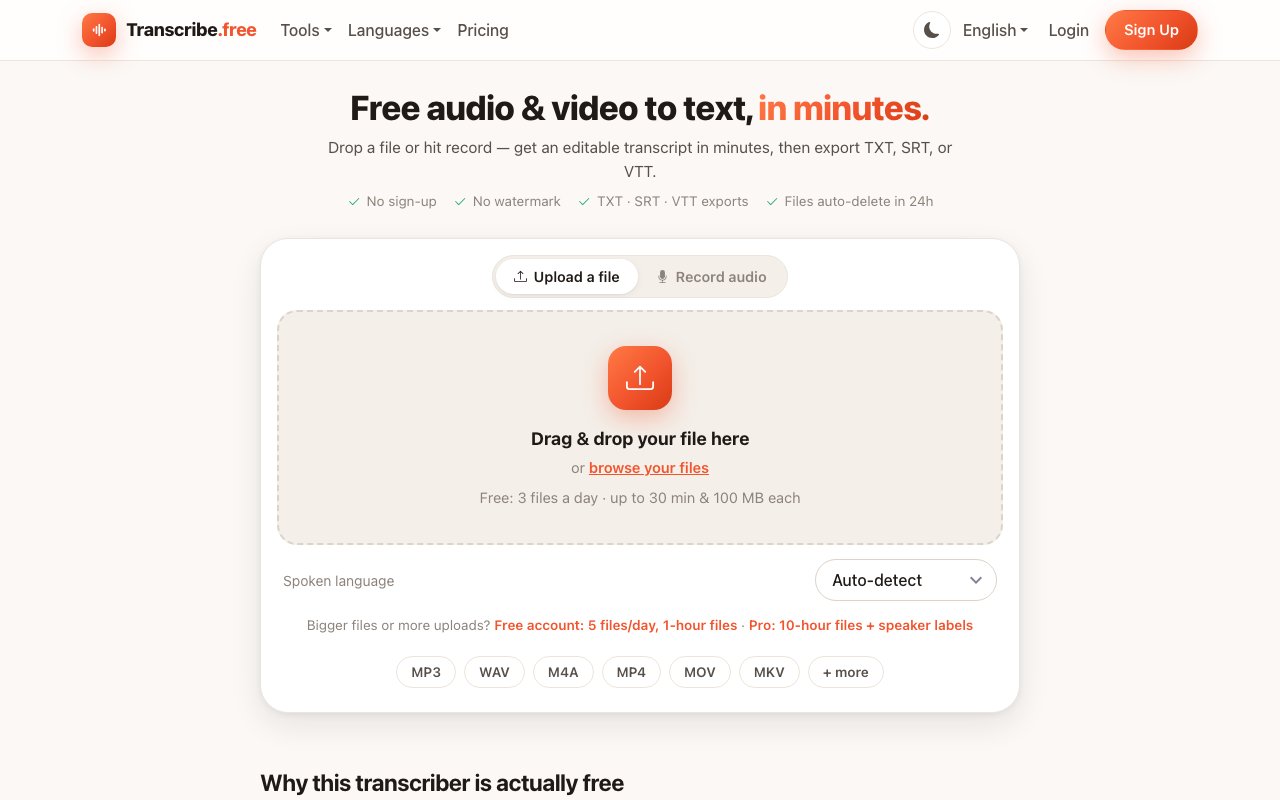
Transcribe.Free is a free tool that turns audio and video into editable text. You drop in a file or hit record in the browser, and it hands back a transcript with automatic punctuation and proper capitalization, usually in a fraction of the recording's length. There's no watermark and no sign-up for the basic path, which is unusual enough that the site spends a section explaining why the free tier is genuinely free rather than a bait. The short version is that short files are cheap to process, so giving them away costs the service almost nothing.
Getting a clean transcript normally means paying per minute, installing software, or handing your files to a service that gates the result behind an account and an email form. This one covers the common case, a recording you need as text, without the meter running and without an account for basic use. Anonymous visitors get three files a day, up to thirty minutes and one hundred megabytes each, with the full set of exports included rather than held back for paying users. The only real limit on the free path is per-file length, not a locked-down feature set.
Behind the scenes it runs a Whisper-class large speech model on the service's own GPU servers, the same family of models professional transcription services use, so quality holds up across accents and messy audio. On clear speech with a decent microphone the site describes accuracy as near-human, a low single-digit word error rate in English and other well-supported languages, with the usual drop when there's heavy background noise, crosstalk, or very quiet recordings. It punctuates and cases the text so a transcript reads like writing rather than subtitles glued together, which saves a round of manual cleanup before the text is usable. For a lot of recordings the result is close enough to paste straight into notes or a document without much editing.
When you record live, words appear as you speak, and finished transcripts open in an editor where you can search the text, toggle timestamps, and click any line to fix it by hand before exporting. It handles a wide spread of formats, so you rarely have to convert anything first. On the audio side that covers common types like MP3, WAV, M4A, FLAC, and Opus, and on the video side it takes MP4, MOV, MKV, WebM, and more, which makes it as handy for captioning a clip as for pulling notes out of a call. Dropping a raw file straight from a phone or a camera usually just works, with no need to trim or re-encode into a special format first.
It supports over ninety languages with automatic detection, and you can export the result as plain TXT or as SRT and VTT subtitle files. The site organizes the same engine into task-shaped entry points, things like meeting, interview, podcast, and voice-memo transcription, an SRT generator, live transcription, and dictation, so you can land straight on the flow you need. Underneath it's one model doing the work, but that framing saves you from figuring out which setting fits your recording, and the subtitle exports mean the same transcript can feed a video timeline without extra formatting.
On privacy it's fairly direct. Files are processed on the service's own servers rather than shared with a third party, anonymous uploads and their transcripts delete themselves twenty-four hours after upload, and it says it never uses your audio to train models. That posture makes it a fit for podcasters, students, journalists, and anyone who wants a quick transcript without setting up an account or worrying about where the recording ends up afterward. If you do make an account, your transcripts are kept in a library instead of expiring, so the twenty-four-hour window is a default for anonymous use rather than a hard rule for everyone. That auto-delete default matters most if the recording is a private interview or a sensitive call you'd rather not leave sitting on a server.
Access is freemium, and the free tier is genuinely the product rather than a teaser. Without signing up you get those three files a day with per-file caps on length and size. A free account raises that to five files a day at up to an hour each and saves your library. A Pro plan, or a credit pack, adds much longer files up to ten hours, speaker labels, priority processing, and DOCX and PDF exports, and the site is upfront that those long-file plans are what pay for the free tier. So the paid tier is aimed squarely at long, multi-speaker recordings while everyday clips stay free, which keeps the incentives honest since the people paying are the ones putting the heaviest load on the servers.
Key Features
- Whisper-class large speech model
- Audio and video file transcription
- In-browser recording with live transcript
- 90+ languages with automatic detection
- TXT, SRT, and VTT exports
- Click-to-fix transcript editor
Pros & Cons
What we like
- Usable with no sign-up for quick jobs
- Handles a wide range of audio and video formats
- Exports subtitle files, not just plain text
- Anonymous uploads auto-delete after 24 hours
Room for improvement
- Free tier caps file length and daily count
- Speaker labels and DOCX exports need Pro
- Processing is server-side, not on-device
- Longest files require a paid plan or credit pack
Frequently Asked Questions
What is Transcribe.Free?
Is Transcribe.Free really free?
What formats and languages does it support?
Does it keep my files?
Best For
Featured in
Alternatives to Transcribe.Free
Trello
The kanban board that taught the rest of the industry what a card was

CalendHub
Smart scheduling and calendar management for teams

Confluence
Atlassian's long-running team wiki that anchors many enterprise knowledge stacks
Kibu
Vertical software for disability service providers covering compliance, documentation, and programming
Reviews (13)
Two months in, no regrets
Have been running Transcribe.Free for a while, here is where I land. Got real value out of usable with no sign-up for quick jobs. Would sign up again without thinking twice.
Pulled its weight from week one
Transcribe.Free has quietly become part of my daily flow. Their take on usable with no sign-up for quick jobs is genuinely good. It fits well for turning a podcast episode into a transcript.
Solid but not perfect
Found Transcribe.Free on a Show HN thread and I am glad I clicked. Where it really wins is 90+ languages with automatic detection. It just works, day after day, without surprises. One thing that bugs me is speaker labels and docx exports need pro. Would sign up again without thinking twice.
Worth a look
Three months of Transcribe.Free later, here is what holds up. Where it really wins is in-browser recording with live transcript. Setup was painless and I was productive the same day. It fits well for generating subtitles for a video. It earns its place in my stack.
Quietly excellent
Three months of Transcribe.Free later, here is what holds up. The core workflow is smooth once you are set up. It handles the boring parts so I can focus on the work that matters.
Genuinely impressed
Started using Transcribe.Free casually, now it is pinned in my dock. Where it really wins is in-browser recording with live transcript. It earns its place in my stack.
Recommended without reservation
Found Transcribe.Free on a Show HN thread and I am glad I clicked. What stands out is how it handles handles a wide range of audio and video formats. It has shaved real time off my week. It fits well for generating subtitles for a video. Would sign up again without thinking twice.
It just works
Found Transcribe.Free on a Show HN thread and I am glad I clicked. It has shaved real time off my week. It does what it says, which is rarer than it should be. No regrets so far.
Solid but not perfect
Tried Transcribe.Free on a side project first, then rolled it out everywhere. Where it really wins is in-browser recording with live transcript. Found it works best for generating subtitles for a video. One thing that bugs me is speaker labels and docx exports need pro. Hard to imagine going back to my old setup.
Pulled its weight from week one
Transcribe.Free solves a real problem for me without making a fuss about it. It handles the boring parts so I can focus on the work that matters. Found it works best for generating subtitles for a video. Worth it for what I get out of it.
Two months in, no regrets
Picked Transcribe.Free for the price, stayed for the quality. What stands out is how it handles click-to-fix transcript editor. It has shaved real time off my week. It earns its place in my stack.
Does the job, a few gripes
Picked Transcribe.Free for the price, stayed for the quality. Their take on whisper-class large speech model is genuinely good. It fits well for capturing meeting notes from a recording. My only gripe is processing is server-side, not on-device.
Exactly what I needed
Have been running Transcribe.Free for a while, here is where I land. Got real value out of audio and video file transcription. It slotted into my routine without much fuss. Found it works best for capturing meeting notes from a recording. Worth it for what I get out of it.
Badge builder
Add Transcribe.Free to your website
Choose a badge style and size, preview it here, then copy the generated HTML. Badge images are self-contained SVGs and do not require an external script.

<a href="https://toolindex.net/tools/transcribe-free?ref=badge" target="_blank" rel="noopener">
  <img src="https://toolindex.net/badge/transcribe-free/medium.svg" alt="Transcribe.Free - Listed on Tool Index" width="180" height="50" />
</a>How to use the badge
- 1. Pick the style, size, and theme that fit your layout.
- 2. Copy the generated HTML from the code block.
- 3. Paste it into your footer, homepage, or press page.
Standard badge available
The standard listing badge is available now. Score and circle badges are limited to tools currently ranked in the top 10 of a category.
Badge clicks return visitors to this profile with a referral tag so the source remains identifiable.
Related Tools
Confluence
Atlassian's long-running team wiki that anchors many enterprise knowledge stacks
Asana
Project management for teams that live in projects, tasks and dependencies
Kevin Gabeci Toolkits
Seven AI toolkits for writing books, making music, cutting video, and building agents.

Logseq
An open-source outliner notes app where every bullet is a first-class block
Work on Transcribe.Free? Request listing access or correction