Vectorify
Convert PNG, JPG and WEBP images into clean, editable SVG files in seconds
Gallery
About Vectorify
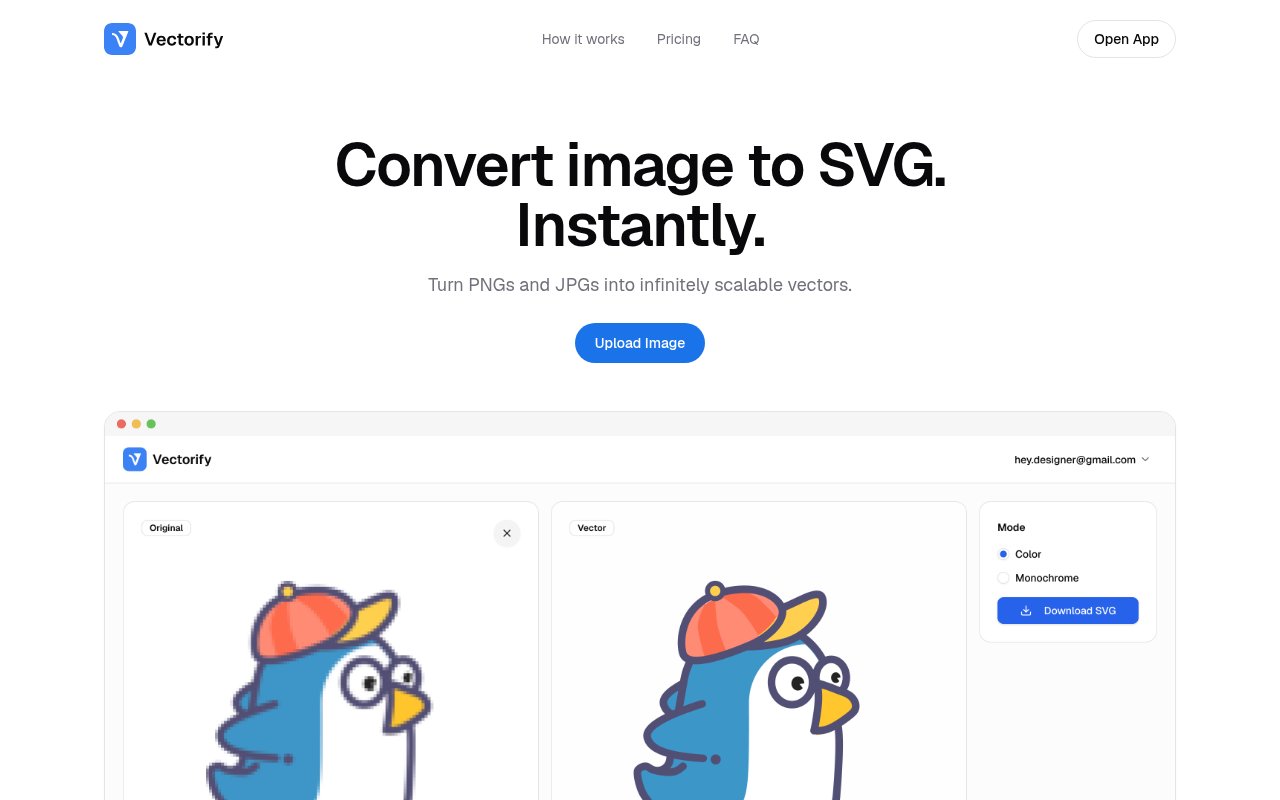
Vectorify is a browser-based converter that turns raster images into SVG files. You upload a PNG, JPG, WEBP, GIF or BMP, the service traces it automatically in a few seconds, and you download a vector version that stays sharp at any size and opens as editable paths in the tools designers already use. An SVG describes shapes as paths rather than pixels, which is why it can be resized without blurring and why a vector logo is what printers, sign makers and front-end developers keep asking for. There's nothing to install, no account dance before you can see a result, and no manual tracing, which is the whole point.
The problem is an old one. A logo arrives as a fuzzy JPG lifted from a client's email signature, an icon set only exists as PNGs, or an illustration needs to go on a banner far larger than the original pixels can carry. Redrawing by hand takes an afternoon a designer doesn't have, and the automatic trace built into some editors produces a jagged mess of anchor points that takes almost as long to clean up. It's the kind of chore that's too small to hire out and too fiddly to enjoy. Vectorify does the conversion for you and aims for output that's clean enough to edit rather than merely large enough to scale.
Using it is a three step loop. Upload the image, wait while it processes, then preview the vectorized result on screen before deciding whether it's worth a credit. Only the download costs anything, so you can test a difficult image and walk away if the trace isn't good enough. The site says colors are optimized for a cleaner editing workflow, transparent PNGs keep their transparency, and the generated SVGs are editable and ready for Figma, Adobe Illustrator, CorelDRAW and other vector tools. Re-downloading a result you've already paid for is free, so you don't lose the file if you misplace it.
It's for designers, developers and anyone else who needs scalable versions of logos, icons and illustrations without the redraw. Front-end developers who want an SVG for a crisp favicon or a responsive header, marketers stuck with a low resolution brand asset, print shops handed a screenshot of a logo, and small business owners who never got the original files from whoever made their mark are the recurring cases. Developers get the same benefit for UI assets, since an SVG icon can be recoloured with CSS and shipped at any pixel density without a second export. It's not a full vector editor and doesn't pretend to be one, so the last stretch of cleanup on a complex, photo-like image still happens in your editor of choice.
What makes it worth a look against the many free tracers online is the combination of a real preview before payment, a no-subscription model, and plain terms about your files. The FAQ states that as long as you have rights to the original image you can use the generated SVGs for commercial and personal projects, and that uploads aren't used to train public AI models. Those two lines answer the questions most people have before dropping a client's logo into a stranger's converter, and plenty of competing tools leave them unanswered.
Where it stops is worth knowing too. File size limits aren't stated on the site, there's no batch upload or API described, and there's no mention of tuning controls such as colour count or path smoothing, so what you get is what the automatic pass produces. The output is a traced SVG rather than a hand-drawn one, so extremely detailed photographs will produce heavy files that a human illustrator would simplify differently. For the common case, a logo or icon that needs to be crisp at any size, that trade is exactly the one most people are happy to make, and the preview tells you within seconds whether your image is the common case.
Pricing is pay as you go with one-time credit packs and no subscription. Five credits cost $3, 25 cost $6, and 50 cost $9, with one credit spent per new SVG download. The maths is simple enough to do in your head. A download costs 60 cents on the smallest pack, 24 cents on the middle one and 18 cents on the largest, so the bigger packs are aimed at people who convert regularly rather than once, and there's no monthly fee ticking over in the background or account tier to outgrow, which is a relief if your need is one logo every few months. Credit purchases are generally final, though the site says verified billing or technical problems are reviewed case by case. Previewing is free, so the habit the tool encourages is to preview generously and download sparingly, and the practical way to evaluate it is to upload your hardest image and look at the result before buying anything. Contact goes to contact@vectorify.co, and the terms are published on the site.
Key Features
- PNG, JPG, WEBP, GIF and BMP input
- Automatic tracing in seconds
- Free preview before spending a credit
- Editable SVG for Figma and Illustrator
- Transparent PNG support
- One-time credit packs, no subscription
Pros & Cons
What we like
- You see the result before you pay for it
- Credits start at $3 with no subscription
- Uploads aren't used to train public AI models
- Re-downloading a saved result is free
Room for improvement
- Credit purchases are generally final
- No file size limits stated on the site
- No API or batch conversion described
- Complex photo-like images still need cleanup in an editor
Frequently Asked Questions
What is Vectorify?
Is Vectorify free?
Can I use the SVGs commercially?
Which tools can open the output?
Best For
Featured in
Alternatives to Vectorify
View all
Framer
Visual website builder that lets designers ship production-grade marketing sites with real CMS, SEO controls, and code components.

Webflow
Visual website builder that produces clean, semantic HTML and CSS, with a CMS, e-commerce, and a Webflow-hosted CDN.

Apatero Studio
Creator studio for AI image, video, audio, 3D, and avatars. Every model worth using, in one workspace.

Pixel Painters
Unlimited graphic design subscriptions built only for churches and ministries
Our take
Tool Index Editorial · Oct 2026· 3.5/5
Vectorify is a browser converter that traces PNG, JPG, WEBP, GIF, or BMP files into editable SVG output. It suits designers and developers rescuing a logo or icon when the original vector is missing. Users can preview the trace before paying, then spend one credit to download. Packs cost $3 for five credits, $6 for 25, or $9 for 50, with no subscription.
We like the honest preview first model and the small entry price. Automatic tracing still works best on clean, flat artwork. Detailed photographs can become heavy collections of paths and need manual cleanup, and the site does not describe batch processing, an API, or detailed controls for color count and smoothing. This is a convenient converter, not a replacement for a vector editor or a careful redraw of important brand artwork.
Editorial opinion from the Tool Index team, written from the public product pages. Not a user review.
Reviews (0)
Badge builder
Add Vectorify to your website
Choose a badge style and size, preview it here, then copy the generated HTML. Badge images are self-contained SVGs and do not require an external script.

<a href="https://toolindex.net/tools/vectorify?ref=badge" target="_blank" rel="noopener">
  <img src="https://toolindex.net/badge/vectorify/medium.svg" alt="Vectorify - Listed on Tool Index" width="180" height="50" />
</a>How to use the badge
- 1. Pick the style, size, and theme that fit your layout.
- 2. Copy the generated HTML from the code block.
- 3. Paste it into your footer, homepage, or press page.
Standard badge available
The standard listing badge is available now. Score and circle badges are limited to tools currently ranked in the top 10 of a category.
Badge clicks return visitors to this profile with a referral tag so the source remains identifiable.
Related Tools
Apatero Studio
Creator studio for AI image, video, audio, 3D, and avatars. Every model worth using, in one workspace.

Tailwind CSS
Rapidly build custom designs without leaving your HTML

Figma
Collaborative interface design tool

Marvel
Lightweight prototyping platform for turning images and screens into clickable mobile and web prototypes.
Work on Vectorify? Request listing access or correction