
WaitToUnlock
Set an iOS Screen Time passcode you can't remember, behind a timer
Gallery
About WaitToUnlock
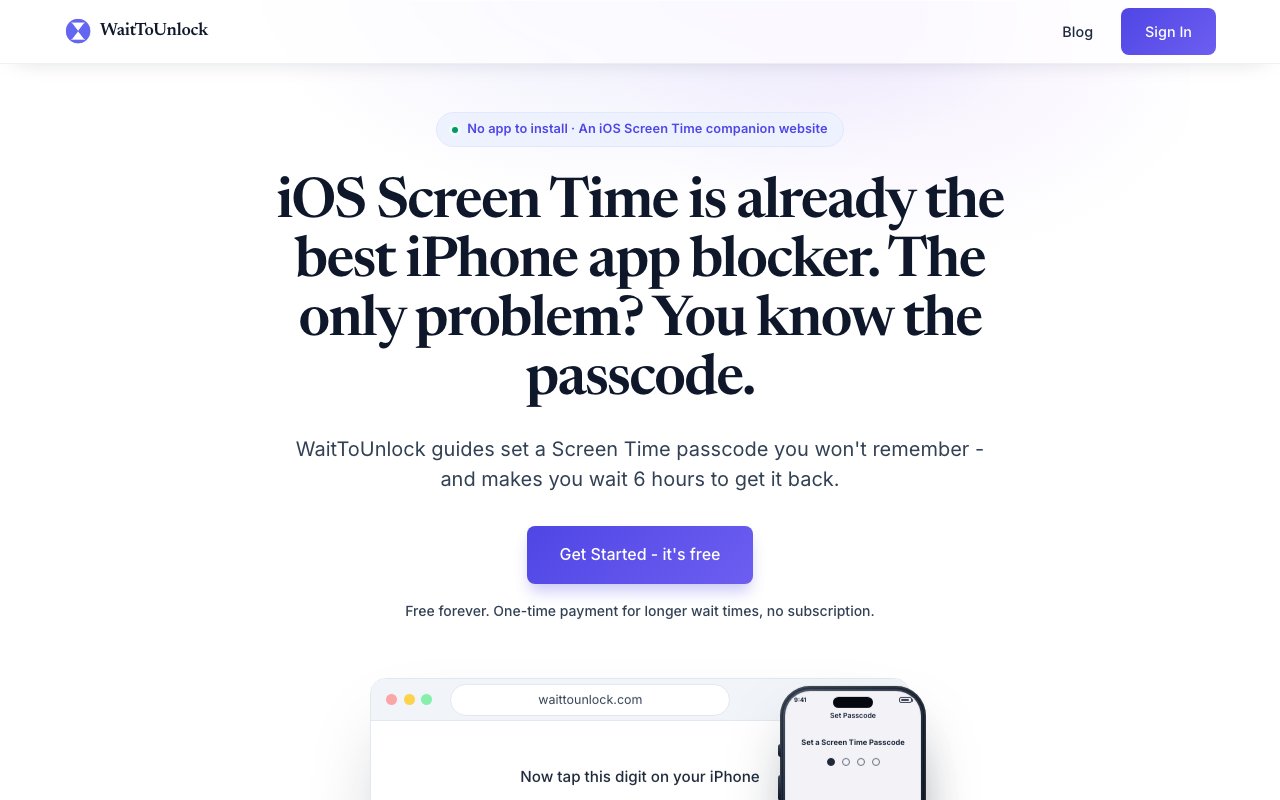
WaitToUnlock is an iOS Screen Time helper built around one honest observation about how Screen Time fails. The feature itself works, but the person who sets the limits is also the person who knows the passcode, so any time willpower dips you can open Settings, type the code you chose, and erase every restriction in seconds. That's the quiet failure mode nearly everyone who tries Screen Time runs into eventually. WaitToUnlock closes the loophole by taking the passcode out of your own hands and putting it behind a timer you can't skip. The limits hold not because you're strong in the moment, but because you literally can't undo them on demand.
The whole thing runs through the website rather than an app you download. It guides you step by step through the digits to enter in your iPhone's built-in Screen Time settings, and the clever part is that it mixes decoy digits into the sequence you tap. Because the real passcode is scattered inside a longer pattern of taps, your fingers never build the muscle memory that would let you reproduce it later. There's no jailbreak, no configuration profile, and no shortcut hack involved, just the normal Screen Time passcode field being filled with a code you'll never be able to type again from memory. By the end of the flow you have a genuine Screen Time passcode guarding your app limits, downtime schedule, and content restrictions, and you honestly don't know what it is.
That randomized passcode is encrypted and stored on WaitToUnlock's servers rather than living anywhere on your device. When you eventually want it back, you start a reveal request and choose how long you're willing to wait, anywhere from six hours up to a full month. The code stays sealed until the countdown reaches zero, and because the service runs around the clock, a reveal you kick off at two in the morning still counts down honestly instead of waiting for business hours. That delay is the entire mechanism, because the urge that makes you want to disable a limit rarely survives hours or days of forced waiting, so most people never actually go through with unlocking.
For something built on such a simple idea, the security work behind it is careful. Passcodes are encrypted with Fernet, which is AES-128 in CBC mode paired with an HMAC-SHA256 signature, and the encryption key is derived using PBKDF2-HMAC-SHA256 across 480,000 iterations in line with current OWASP recommendations. The encrypted values sit in Google Firestore with replication across data centers, decryption happens only server-side at the precise moment you complete a reveal, and the plaintext passcode and keys are never written to logs or shared with third parties. Requests are authenticated with a Firebase ID token verified on the server, so you can only ever reach your own code.
It's aimed squarely at people who already lean on Screen Time but keep sabotaging it, the familiar loop where you set a strict limit at night and quietly remove it the next morning. The restrictions it protects cover the same ground Screen Time already does, meaning app and category limits, downtime windows, and content and privacy settings, so whatever you've configured is what gets locked behind the timer. Because nothing installs on the phone, there's no companion app sitting on your home screen to delete the moment you get annoyed, which removes the usual escape hatch. That framing also makes the tradeoff clear, since you're handing your passcode to a small outside service and trusting it to hold and return the code on schedule, so this fits someone who wants stronger external friction more than someone who insists on keeping everything under local control.
The company behind it is based in London and keeps its data footprint deliberately small. The only information it holds is your email address, when the account was created, whether you have lifetime access, and the encrypted passcode itself. It states plainly that there's no tracking profile and nothing gets sold, and deleting your account removes all of it. Traffic runs over HTTPS with HSTS enforcement and a strict content security policy, which is the kind of detail you'd want from any service asked to guard the key to your own phone.
Access is freemium with no subscription anywhere in the model. The free plan works forever and covers wait windows up to six hours, which is enough friction to kill most late-night impulses on its own. A single one-time payment of $19.99, labeled Lifetime, unlocks the longer waits that stretch all the way to a month, for people who want the block to hold across days rather than a single evening. There's no recurring charge and no upsell beyond that one upgrade, so you can try the core idea at no cost and only pay once if the six-hour ceiling turns out to be too short for the habit you're fighting.
Key Features
- Randomized Screen Time passcode setup
- Decoy-digit entry method
- Server-side encrypted passcode storage
- Adjustable wait window up to a month
- No app to install
- One-time lifetime upgrade
Pros & Cons
What we like
- Adds real friction without any app to delete
- Works with the built-in iOS Screen Time feature
- Passcode is encrypted and never shown until the timer ends
- One-time payment with no subscription
Room for improvement
- iOS only, with nothing for Android
- Trusts a third-party server to hold your passcode
- Free tier caps the wait window at six hours
- Only useful if you genuinely want stricter limits
Frequently Asked Questions
What is WaitToUnlock?
Does WaitToUnlock install anything on my phone?
Is WaitToUnlock free?
Where is my passcode stored?
Best For
Featured in
Alternatives to WaitToUnlock
Trello
The kanban board that taught the rest of the industry what a card was

CalendHub
Smart scheduling and calendar management for teams

Confluence
Atlassian's long-running team wiki that anchors many enterprise knowledge stacks
Kibu
Vertical software for disability service providers covering compliance, documentation, and programming
Reviews (10)
Powerful once it clicks
Tried WaitToUnlock on a side project first, then rolled it out everywhere. Got real value out of decoy-digit entry method. It has shaved real time off my week. Mostly using it for keeping screen time limits from being disabled on a whim. The catch is trusts a third-party server to hold your passcode. Worth it for what I get out of it.
Worth a look
WaitToUnlock has quietly become part of my daily flow. The one-time lifetime upgrade is more useful than I expected. It has shaved real time off my week. Found it works best for breaking a late-night phone habit. It earns its place in my stack.
Decent with some rough edges
Have been running WaitToUnlock for a while, here is where I land. Where it really wins is randomized screen time passcode setup. It just works, day after day, without surprises. Mostly using it for enforcing a focus period during work hours. It would be a five if not for free tier caps the wait window at six hours.
Pulled its weight from week one
Hadn't planned on switching, but WaitToUnlock was hard to ignore. Where it really wins is one-time payment with no subscription. Mostly using it for keeping screen time limits from being disabled on a whim. It earns its place in my stack.
Powerful once it clicks
WaitToUnlock has quietly become part of my daily flow. What stands out is how it handles adjustable wait window up to a month. It slotted into my routine without much fuss. Found it works best for enforcing a focus period during work hours. It would be a five if not for only useful if you genuinely want stricter limits.
Two months in, no regrets
Hadn't planned on switching, but WaitToUnlock was hard to ignore. It has shaved real time off my week. It earns its place in my stack.
Quietly excellent
Have been running WaitToUnlock for a while, here is where I land. Got real value out of no app to install. The defaults are sensible, so I was not fighting settings on day one. Recommending it to people in a similar spot.
Finally something that fits
Have been running WaitToUnlock for a while, here is where I land. What stands out is how little babysitting it needs. Mostly using it for enforcing a focus period during work hours. Glad I made the switch.
It just works
Hadn't planned on switching, but WaitToUnlock was hard to ignore. The thing I keep coming back to is how reliable it is. It does what it says, which is rarer than it should be. Mostly using it for keeping screen time limits from being disabled on a whim. No regrets so far.
Pulled its weight from week one
Picked WaitToUnlock for the price, stayed for the quality. Got real value out of no app to install. The interface stays out of my way, which I appreciate. Found it works best for locking yourself out of distracting apps. No regrets so far.
Badge builder
Add WaitToUnlock to your website
Choose a badge style and size, preview it here, then copy the generated HTML. Badge images are self-contained SVGs and do not require an external script.

<a href="https://toolindex.net/tools/waittounlock?ref=badge" target="_blank" rel="noopener">
  <img src="https://toolindex.net/badge/waittounlock/medium.svg" alt="WaitToUnlock - Listed on Tool Index" width="180" height="50" />
</a>How to use the badge
- 1. Pick the style, size, and theme that fit your layout.
- 2. Copy the generated HTML from the code block.
- 3. Paste it into your footer, homepage, or press page.
Standard badge available
The standard listing badge is available now. Score and circle badges are limited to tools currently ranked in the top 10 of a category.
Badge clicks return visitors to this profile with a referral tag so the source remains identifiable.
Related Tools
Confluence
Atlassian's long-running team wiki that anchors many enterprise knowledge stacks
Asana
Project management for teams that live in projects, tasks and dependencies
Kevin Gabeci Toolkits
Seven AI toolkits for writing books, making music, cutting video, and building agents.

Logseq
An open-source outliner notes app where every bullet is a first-class block
Work on WaitToUnlock? Request listing access or correction