
Widen
Native Mac Postgres GUI with text-to-SQL that verifies queries before running them
Gallery
About Widen
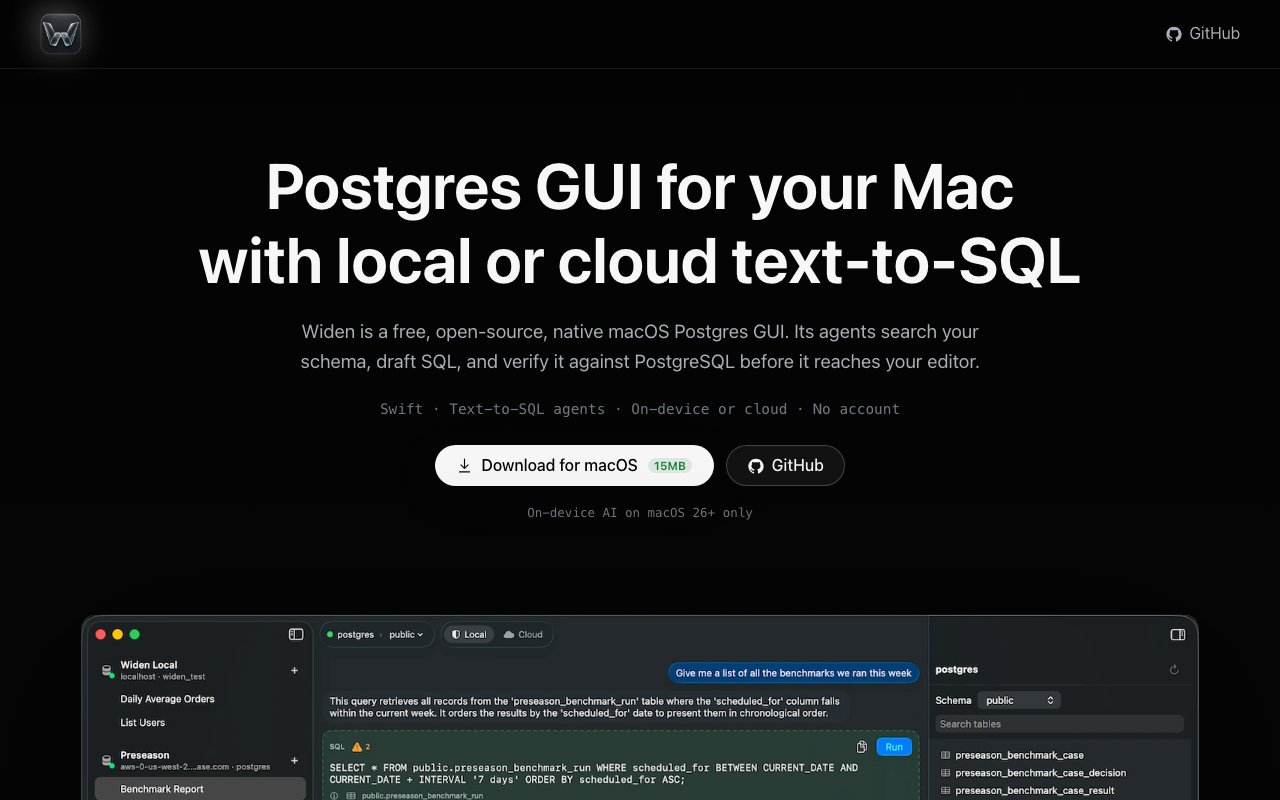
Widen is a native macOS application that gives you a graphical interface for PostgreSQL databases along with AI-powered text-to-SQL generation. Instead of writing queries by hand, you can describe what you want in plain English and let the app draft the SQL for you. The twist is that Widen doesn't just generate queries and hope for the best. It validates them against your actual database schema before anything reaches your editor, catching errors before they become problems. That validation step is what separates it from most text-to-SQL tools, which tend to hallucinate table names or misunderstand relationships when schemas get complex.
The underlying agent system is smarter than a simple prompt dump, which is where most AI SQL tools fall short. Rather than cramming your entire schema into context and praying the model gets it right, Widen searches your schema to find the relevant tables and columns for your specific question. It drafts the SQL based on what it discovers, then runs the query through a read-only PostgreSQL transaction to verify it actually works before showing you anything. Only after that verification step does the query appear in your editor. This approach reduces hallucinations significantly and means you spend less time debugging generated SQL that references tables that don't exist or joins that don't make sense.
You can run Widen in two modes depending on your privacy needs and model preferences. On-device mode uses Apple Intelligence, available on macOS 26 and later, to generate queries entirely offline. Nothing leaves your machine, which matters if you're working with sensitive data or in an environment with strict data handling policies. Cloud mode lets you bring your own API key from OpenRouter, giving you access to frontier models like Claude or GPT-4 when you need more capability than local inference can provide. Either way, you control what runs where, and the choice is yours to make on a session-by-session basis.
Query execution supports SELECT, INSERT, UPDATE, and DELETE, covering the full range of operations you'd typically run against a database. But the app builds in safety rails to prevent accidents when you're working quickly. There's a review-before-run workflow so you can inspect what's about to execute and catch mistakes before they hit the database. Row caps prevent runaway queries from returning millions of rows and freezing your session. Confirmation dialogs appear before risky writes like DELETEs or UPDATEs without WHERE clauses. These features matter when you're working with production data and a careless query could cause real damage or require a restore from backup.
Sessions persist across application restarts, so you don't lose your work if you close the app or your machine reboots. Your conversation transcript and SQL history stick around, making it easy to re-run queries you've used before or pick up a debugging session where you left off the previous day. Credentials are stored in the macOS Keychain rather than in plaintext config files, which is a small but meaningful security detail that some competing tools overlook. The persistence also means you can build up a library of useful queries over time without maintaining a separate snippet file.
Widen is completely free and released under the MIT license, which makes it an easy choice to try without budget approval or license negotiations. The only cost you might face is from cloud models if you choose to use them through OpenRouter, and that's billed directly by OpenRouter, not by Widen. If you stick to on-device mode, there's no cost at all beyond owning a Mac that supports Apple Intelligence. For teams evaluating tools, the open-source nature also means you can audit the code, fork it, or contribute fixes if something doesn't work the way you need.
The app is focused and opinionated, which means some features aren't there yet and may never arrive. It's PostgreSQL only, so MySQL, SQLite, or SQL Server users will need to look elsewhere. There's no table structure editor for modifying schemas visually, no syntax highlighting in the SQL editor, and query results don't persist across sessions, so you'll need to re-run queries if you want to see the data again after closing the app. On-device mode is currently limited to SELECT queries on simpler schemas, so complex multi-table operations will push you toward cloud models. Still, for developers who manage their own Postgres databases and want natural language query generation with built-in verification, Widen offers a clean, private, and free option that doesn't require trusting a third-party service with your data.
Key Features
- Text-to-SQL with schema-aware search
- Query verification before execution
- On-device mode via Apple Intelligence
- Cloud mode with OpenRouter API keys
- Schema browsing and session persistence
- Confirmation prompts for data modifications
Pros & Cons
What we like
- Completely free and open source under MIT license
- Verifies SQL against Postgres before running anything
- On-device mode keeps everything offline on Apple Silicon
- Native Swift app feels fast and Mac-native
Room for improvement
- PostgreSQL only with no MySQL or SQLite support yet
- On-device mode limited to simple SELECT queries
- Query results don't persist across app restarts
- Early release with a smaller feature set than mature GUIs
Frequently Asked Questions
What is Widen?
Is Widen free?
Does Widen work offline?
Who is Widen for?
Best For
Featured in
Alternatives to Widen
View allMongoDB Atlas
The fully-managed cloud version of MongoDB with built-in search, vector search, time series, and serverless tiers.

Neon
Serverless Postgres with database branching, scale-to-zero compute, and a generous free tier.

Airtable
Spreadsheet-database hybrid with linked records, multiple views, automations, and an interface designer for internal apps.

DataExpert.io Academy
Live and self-paced academy that trains you for real data engineering and AI jobs
Reviews (0)
Badge builder
Add Widen to your website
Choose a badge style and size, preview it here, then copy the generated HTML. Badge images are self-contained SVGs and do not require an external script.

<a href="https://toolindex.net/tools/widen?ref=badge" target="_blank" rel="noopener">
  <img src="https://toolindex.net/badge/widen/medium.svg" alt="Widen - Listed on Tool Index" width="180" height="50" />
</a>How to use the badge
- 1. Pick the style, size, and theme that fit your layout.
- 2. Copy the generated HTML from the code block.
- 3. Paste it into your footer, homepage, or press page.
Standard badge available
The standard listing badge is available now. Score and circle badges are limited to tools currently ranked in the top 10 of a category.
Badge clicks return visitors to this profile with a referral tag so the source remains identifiable.
Related Tools

Supabase
The open source Firebase alternative

Sleep Suivour
Track your sleep, improve your rest

Upstash
Serverless Redis, Kafka, and QStash for modern applications
PlanetScale
Serverless MySQL platform with branching and zero-downtime migrations
Work on Widen? Request listing access or correction