
ZoomHub
Host huge images and PDFs as fast, zoomable viewers for any website
Gallery
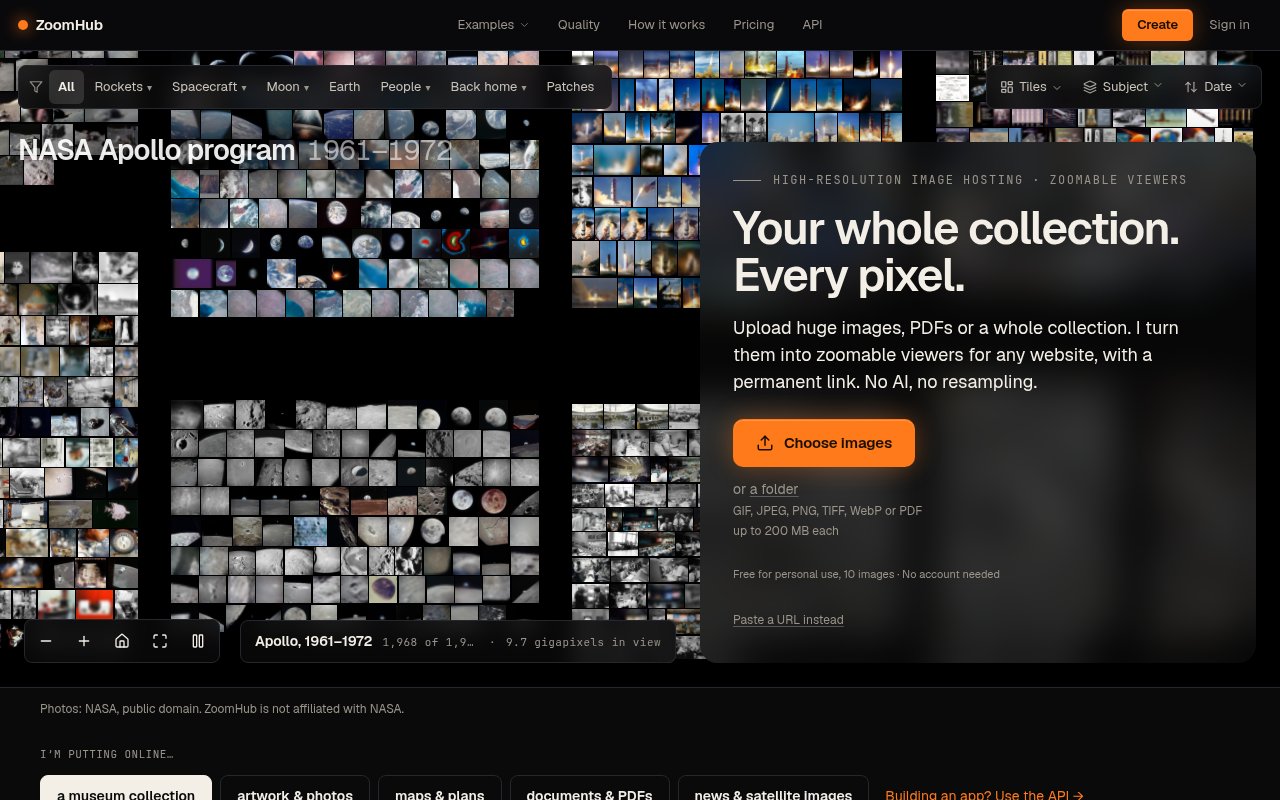
About ZoomHub
ZoomHub is an image hosting service built for files that lose their value when a normal website shrinks them. It takes very large images, maps, scans, artwork, and PDFs and turns them into responsive viewers that visitors can pan and zoom in a browser. Each upload gets a permanent share link, and the same viewer can be placed on another site with a short embed. That makes it practical to publish details such as street names on a map, brushwork in a painting, or notes in a manuscript without asking every visitor to download the original file. The submitted Brick Atlas is one example of that technology, while ZoomHub itself is the broader product behind it.
The service uses the familiar deep zoom approach. After an image is uploaded, ZoomHub cuts it into a pyramid of small tiles at several resolutions. A viewer requests only the handful of tiles needed for the part of the image currently on screen, then loads finer tiles as someone zooms in. A multi-gigapixel source can therefore open without pushing every pixel through the browser at once. ZoomHub says it doesn't use AI to upscale, sharpen, or invent detail. It also doesn't resample the full-size source. Lossless PNG and TIFF files keep their pixels and transparency, while photographs are served through high-quality JPEG tiles. The result is meant to preserve the actual information in the source rather than create an approximation of it.
Getting an image online doesn't require a custom viewer or a build step. A user can upload a file or provide a source URL, confirm the email ZoomHub sends, and receive both a share URL and embed HTML. Supported files include JPEG, PNG, TIFF, WebP, GIF, and PDF. The no-code embed editor supports layouts such as justified galleries, grids, and horizontal strips, along with navigation controls, slideshow timing, and an accent color. Changes made later can flow through to embeds already placed on a site. There are also purpose-built presentations for multi-page PDFs, collections, maps with a minimap, and before-and-after comparisons that keep two images synchronized while the reader explores them. Individual PDFs can be arranged with every page together or as one continuous strip. The visitor-facing controls work with a mouse or touch, so the same published asset can be explored on desktop and mobile screens.
ZoomHub is a particularly good fit for museums, libraries, archives, cartographers, photographers, publishers, and anyone maintaining a collection of unusually detailed visual material. A museum can give each object a stable link and assemble those objects into a gallery. A photographer can send a private preview before publication. A newsroom can place a satellite image, court document, or comparison directly in its CMS. A developer can use the REST API to convert an image from a URL, watch its processing status, and retrieve the resulting share link and embed code. Business plans add API keys for immediate uploads and metadata such as titles, descriptions, and reference IDs.
Privacy and continuity are treated as product features rather than afterthoughts. Paid accounts can protect an image with a password, and the restriction covers the actual tiles as well as the public page. An asset can move from protected to public without changing its link or embed code. That matters for embargoed scans, unreleased artwork, and client work that will eventually be published in place. ZoomHub also presents itself as the independent successor to Microsoft's earlier zoom.it service. Its site says old images from that service still load and that hundreds of websites currently embed ZoomHub viewers. The focus is narrow, but it addresses a real publishing problem with a hosted workflow rather than asking customers to generate and operate their own tile infrastructure.
Access is freemium. The free plan is for personal use and includes up to 10 images, links, embeds, comparisons, galleries, and PDFs, with files up to 200 MB and a ZoomHub badge on embeds. Commercial use requires a paid plan. Starter is listed at $29 per month for 50 images, password protection, badge-free viewers, and files up to 5 GB. Higher plans expand the collection allowance, and the Business plan adds API keys. Each page of a PDF counts as an image, which is worth considering for long documents. Annual billing includes two months free, and enterprise pricing is available for collections beyond the standard limits. ZoomHub is most compelling when original resolution is part of the content, not merely a larger download.
Key Features
- High-resolution image and PDF hosting
- Zoomable viewer embeds
- No-code embed editor
- Password-protected private images
- Synchronized image comparisons
- REST API for automated uploads
Pros & Cons
What we like
- Preserves every uploaded pixel
- Handles files up to 5 GB
- Embeds work in any CMS
- Permanent links survive viewer updates
Room for improvement
- Free use is limited to personal projects
- Commercial use requires a paid plan
- API keys require the Business plan
- Every PDF page counts as an image
Frequently Asked Questions
What is ZoomHub?
Does ZoomHub alter uploaded images?
Is ZoomHub free?
Can ZoomHub handle private images and automated uploads?
Best For
Featured in
Alternatives to ZoomHub
View allMongoDB Atlas
The fully-managed cloud version of MongoDB with built-in search, vector search, time series, and serverless tiers.
Hetzner
High-performance European cloud hosting at unbeatable prices

Railway
Deploy apps to production infrastructure in seconds
Cloudflare Pages
Free Jamstack hosting on Cloudflares edge with unlimited bandwidth and tight integration with Workers.
Reviews (0)
Badge builder
Add ZoomHub to your website
Choose a badge style and size, preview it here, then copy the generated HTML. Badge images are self-contained SVGs and do not require an external script.

<a href="https://toolindex.net/tools/zoomhub?ref=badge" target="_blank" rel="noopener">
  <img src="https://toolindex.net/badge/zoomhub/medium.svg" alt="ZoomHub - Listed on Tool Index" width="180" height="50" />
</a>How to use the badge
- 1. Pick the style, size, and theme that fit your layout.
- 2. Copy the generated HTML from the code block.
- 3. Paste it into your footer, homepage, or press page.
Standard badge available
The standard listing badge is available now. Score and circle badges are limited to tools currently ranked in the top 10 of a category.
Badge clicks return visitors to this profile with a referral tag so the source remains identifiable.
Related Tools

Coolify
Self-hostable, open source alternative to Heroku and Netlify
Hetzner
High-performance European cloud hosting at unbeatable prices

Upstash
Serverless Redis, Kafka, and QStash for modern applications

Heroku
The original git-push PaaS. Owned by Salesforce, still kicking, still the easiest way to deploy a Rails or Django app.
Work on ZoomHub? Request listing access or correction