
DeviceKit
Free Screen & Device Tests Online | Private Browser Diagnostics
Gallery
About DeviceKit
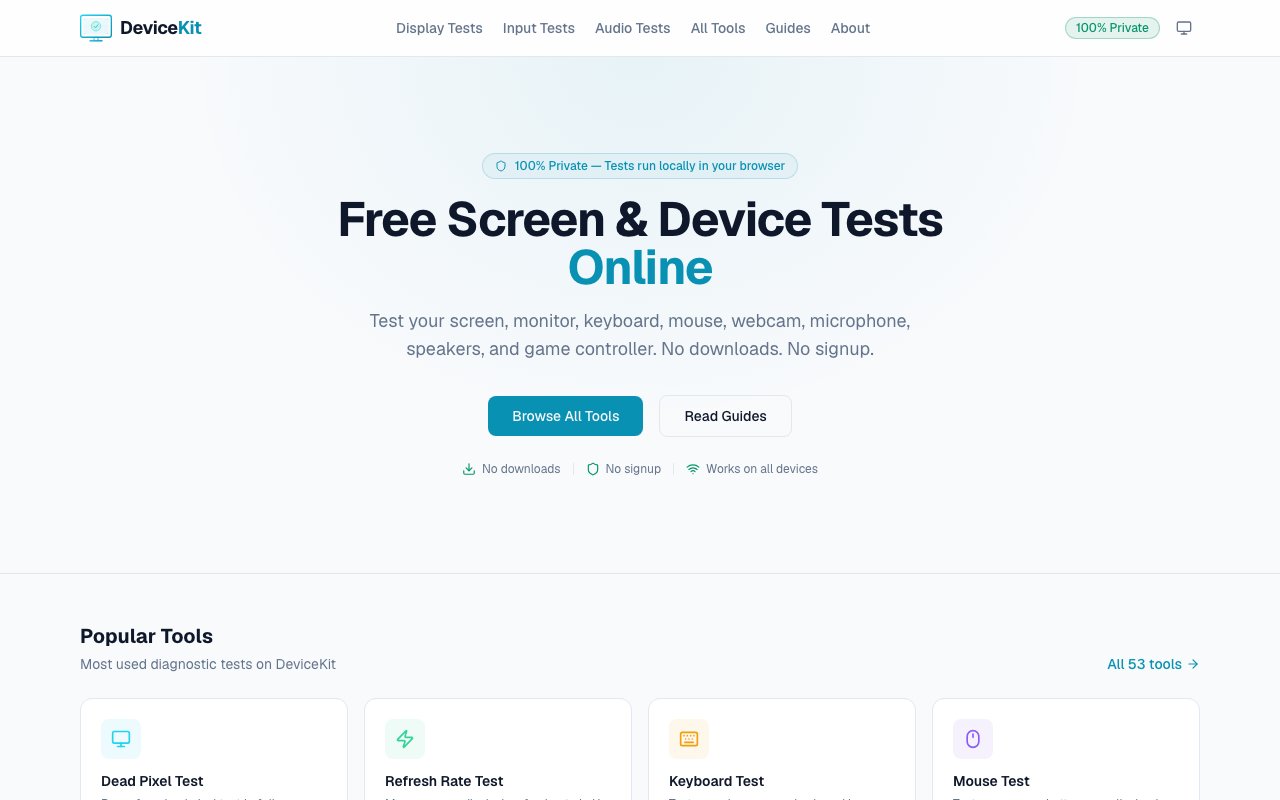
DeviceKit is a browser-based collection of diagnostic tools for testing computer hardware without downloading any software. The platform offers fifty-three individual tests organized across six categories covering displays, input devices, audio equipment, cameras, controllers, and general device information. Users can check monitors for dead pixels, measure refresh rates, verify keyboard and mouse functionality, test webcam and microphone performance, assess speaker quality, and gather detailed system specifications. Everything runs directly in the browser, making it accessible from virtually any device with a modern web browser.
The testing process follows a simple three-step pattern. Users select a test from the available options, run it directly in their browser, and receive instant results. Display tests include dead pixel detection, color accuracy checks, backlight bleed assessment, and refresh rate measurement. Input tests cover keyboard functionality, mouse precision, and trackpad response. Audio tests verify speaker output and microphone input quality. Camera tests assess webcam functionality and image quality. Controller tests work with gamepads and other input devices. Device information tools gather system details like screen resolution, browser capabilities, and hardware specifications.
Privacy stands as a central design principle for DeviceKit. Every test runs locally on the user's device without uploading any data to external servers. Camera feeds, microphone input, keyboard strokes, and all other diagnostic data stay entirely on the device being tested. This approach eliminates the privacy concerns that come with cloud-based diagnostic services, making DeviceKit suitable for testing equipment in environments where data security matters. Corporate IT teams, privacy-conscious individuals, and anyone testing devices containing sensitive information can use the platform without worrying about their data leaving the machine.
The platform works across an unusually broad range of devices. Traditional desktop monitors, laptops, smartphones, tablets, smart TVs, and Chromebooks all support the browser-based tests. This universal compatibility means a single tool can handle diagnostic needs across an entire device ecosystem rather than requiring different software for different platforms. For someone managing multiple devices or helping others troubleshoot remotely, this consistency simplifies the process considerably. There's no need to guide someone through downloading and installing platform-specific diagnostic software when a browser link accomplishes the same goal.
Practical use cases span from casual verification to professional troubleshooting. Consumers buying used monitors can run dead pixel tests before finalizing purchases. Remote workers can verify their webcam and microphone function properly before important video calls. Gamers can test controller responsiveness and display refresh rates to ensure their equipment performs as expected. IT support teams can diagnose hardware issues without physical access to machines by walking users through browser-based tests. Content creators can verify audio input quality before recording sessions. The range of tests covers enough ground that most common hardware questions can be answered through the platform.
DeviceKit distinguishes itself from downloadable diagnostic utilities through instant accessibility and zero installation overhead. Traditional diagnostic software requires downloading executables, potentially dealing with compatibility issues, and often granting elevated system permissions. Browser-based tests sidestep all of this, trading some depth of access for immediate availability. For quick checks and common diagnostic needs, this tradeoff favors convenience. Users who need deeper system-level diagnostics might still require dedicated software, but DeviceKit handles the majority of hardware verification tasks that most people encounter.
The entire platform is free to use with no signup required. There are no premium tiers, subscription fees, or feature gates. Users simply visit the site, select their desired test, and receive results without any transaction or account creation. This completely free model removes all friction from hardware testing, making it a practical first stop whenever device functionality comes into question. Whether verifying a new purchase, troubleshooting an intermittent problem, or simply curious about device specifications, DeviceKit provides immediate answers without cost or commitment.
Key Features
- Screen and dead-pixel tests
- Camera and microphone checks
- Browser-based diagnostics
- Privacy-first design with no data leaving the device
Pros & Cons
What we like
- Completely free with nothing to install
- Runs entirely in the browser
- Privacy-first, diagnostics stay on your device
- Covers screen, camera, and microphone checks
Room for improvement
- Limited to what a browser is allowed to access
- No saved history across sessions
Frequently Asked Questions
What is DeviceKit?
Is DeviceKit free?
Is DeviceKit private?
Who should use DeviceKit?
Best For
Featured in
Alternatives to DeviceKit

Playwright
Microsofts open-source end-to-end browser testing framework for Chromium, Firefox, and WebKit with one API.

Chromatic
Visual regression testing and review platform built by the Storybook team, with cloud-rendered snapshots and PR integration.

Storybook
Open-source workshop for building UI components in isolation. Preview, document, and test them outside the app.

Insomnia
Open-source API client for REST, GraphQL, gRPC, and WebSockets. Postmans more polished, less corporate cousin.
Reviews (12)
Worth the price of admission
DeviceKit solves a real problem for me without making a fuss about it. What stands out is how little babysitting it needs. It handles the boring parts so I can focus on the work that matters. Recommending it to people in a similar spot.
Does the job, a few gripes
DeviceKit has quietly become part of my daily flow. What stands out is how little babysitting it needs. Genuine strength is that it gets out of the way and lets me work. The docs could go a bit deeper in places. Recommending it to people in a similar spot.
Exactly what I needed
Tried DeviceKit on a side project first, then rolled it out everywhere. What stands out is how little babysitting it needs. The output quality holds up better than I expected. Worth the price for what I get out of it.
Exactly what I needed
Onboarded the whole team to DeviceKit in an afternoon. It does what it says, which is rarer than it should be. It has shaved real time off my week. Would sign up again without thinking twice.
It just works
Started using DeviceKit casually, now it is pinned in my dock. It handles the boring parts so I can focus on the work that matters. Glad I made the switch.
Solid daily driver
DeviceKit solves a real problem for me without making a fuss about it. It does what it says, which is rarer than it should be. It handles the boring parts so I can focus on the work that matters.
Good, with a few caveats
Came to DeviceKit after getting frustrated with what I had before. It is the rare tool that got better the more I used it. I expected to churn off it in a week and I am still here. Not perfect, but the rough edges are minor.
Bought it for one feature, stayed for ten
Picked DeviceKit for the price, stayed for the quality. Nothing flashy, it simply pulls its weight every day. It earns its place in my stack.
Solid but not perfect
Started using DeviceKit casually, now it is pinned in my dock. Performance has been steady even when I lean on it hard. It took me a bit to get comfortable with it. It earns its place in my stack.
Finally something that fits
Three months of DeviceKit later, here is what holds up. The output quality holds up better than I expected. It just works, day after day, without surprises.
Quietly excellent
Found DeviceKit on a Reddit thread and I am glad I clicked. Performance has been steady even when I lean on it hard. Setup was painless and I was productive the same day. Easy yes for anyone weighing the same trade offs.
Powerful once it clicks
Started using DeviceKit casually, now it is pinned in my dock. Performance has been steady even when I lean on it hard. Pricing could be a little simpler to reason about. Glad I made the switch.
Badge builder
Add DeviceKit to your website
Choose a badge style and size, preview it here, then copy the generated HTML. Badge images are self-contained SVGs and do not require an external script.

<a href="https://toolindex.net/tools/devicekit?ref=badge" target="_blank" rel="noopener">
  <img src="https://toolindex.net/badge/devicekit/medium.svg" alt="DeviceKit - Listed on Tool Index" width="180" height="50" />
</a>How to use the badge
- 1. Pick the style, size, and theme that fit your layout.
- 2. Copy the generated HTML from the code block.
- 3. Paste it into your footer, homepage, or press page.
Score badge available
DeviceKit qualifies for the score and circle badges based on its current top-10 positionin Testing.
Badge clicks return visitors to this profile with a referral tag so the source remains identifiable.
Related Tools
Chromatic
Visual regression testing and review platform built by the Storybook team, with cloud-rendered snapshots and PR integration.
Playwright
Microsofts open-source end-to-end browser testing framework for Chromium, Firefox, and WebKit with one API.

Tests.ws
WebSocket testing tools, protocol guides, and a Chrome extension for developers

AgentsProof
Trace, grade and share proof that your AI agent actually works
Work on DeviceKit? Request listing access or correction