
Tests.ws
WebSocket testing tools, protocol guides, and a Chrome extension for developers
Gallery
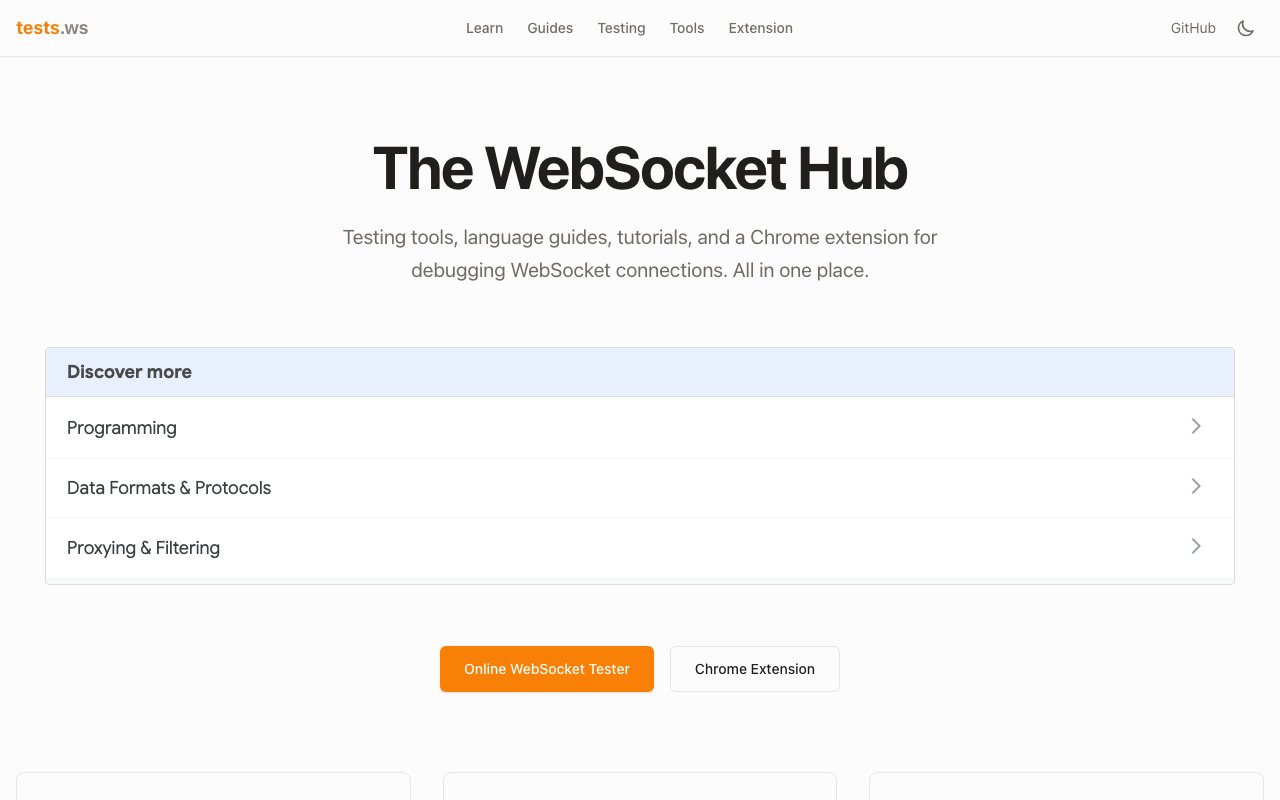
About Tests.ws
WebSocket development comes with debugging challenges that differ fundamentally from traditional HTTP request and response cycles. Connections persist, messages flow bidirectionally, and problems often manifest as subtle timing issues or silent failures rather than clear error codes. Tests.ws provides a focused collection of browser-based tools and educational resources specifically for developers working with WebSocket connections. The platform includes an online tester for connecting to any WebSocket server, a free echo server for controlled experimentation, a Chrome extension for inspecting live traffic, and more than thirty implementation guides covering every major programming language and framework. Everything runs directly in the browser or installs as a lightweight extension, so there's no local development environment to configure.
The WebSocket tester serves as the primary tool and handles the task that developers need most frequently during development. Users enter a server URL, establish a connection with a single click, then send messages and watch responses arrive in real time. This immediate feedback loop makes debugging connection issues far more efficient than scattering console logs throughout application code. The tester manages the protocol handshake automatically, displays connection state changes clearly, and provides a clean interface for composing test messages. When something goes wrong during the handshake or message exchange, the problem usually becomes apparent within seconds rather than requiring extended investigation across multiple log files.
For situations where developers don't yet have a server ready, the platform provides a free echo server that returns any message sent to it unchanged. This straightforward service proves invaluable during initial client development when the immediate goal is verifying that connection code sends and receives properly before introducing actual server logic. Developers can confirm their client handles message encoding correctly, maintains persistent connections appropriately, and responds to server pushes as expected, all without writing backend code or deploying infrastructure. The echo server stays available continuously without authentication, making it useful for quick experiments, demos, or classroom scenarios where standing up infrastructure would add friction.
The Chrome extension extends testing capabilities beyond controlled environments into production websites. Instead of relying on what the browser's standard network tab reveals about WebSocket traffic, the extension provides specialized inspection tools designed for WebSocket frame analysis. Developers can monitor message flows on any site that uses WebSockets, examine payload contents in detail, and even intercept traffic to test how applications handle unexpected responses. This proves particularly useful when debugging integration issues with third-party services or reverse-engineering undocumented APIs. The extension is open source and available through the Chrome Web Store, with code published on GitHub.
Educational content rounds out the platform's value. The guide collection spans over thirty practical implementation tutorials across JavaScript, TypeScript, Python, Go, C++, C#, Java, Kotlin, PHP, Dart, Rust, and Swift. Framework-specific guides address Angular, React, NestJS, Django, FastAPI, Spring Boot, Laravel, and Flutter, covering the most common environments where developers encounter WebSocket requirements. Infrastructure topics include Nginx proxy configuration for WebSocket passthrough, Cloudflare Workers deployment patterns, and AWS API Gateway WebSocket setup. Each guide delivers actual code examples rather than theoretical explanations, showing patterns that work reliably in production.
Advanced topics extend into areas that trip up experienced developers. Guides cover Redis pub/sub broadcasting for scaling WebSocket connections across multiple server instances, GraphQL subscription implementations that layer real-time capabilities onto GraphQL APIs, and STOMP messaging protocol integration for applications requiring structured message routing. IoT-focused content addresses WebSocket implementations on ESP32 and ESP8266 microcontrollers, which have memory and processing constraints that require different approaches than server environments. TLS security configuration, authentication patterns, and production deployment checklists round out the collection.
All tools on the platform appear to be free, with the echo server explicitly documented as available without charge and the Chrome extension offered as open source. This positions Tests.ws as a community reference resource rather than a commercial product, which explains both the breadth of language coverage and the absence of paywalled content. Developers can bookmark the site as a reliable reference for WebSocket work, returning whenever they need to test a connection, debug an integration, or learn how WebSockets work in a language they haven't used before. The combination of practical tools for immediate problems and comprehensive documentation for deeper learning makes the platform valuable across experience levels.
Key Features
- Browser based WebSocket tester
- Free echo server for testing
- Chrome extension for traffic monitoring
- Protocol documentation and guides
- Language tutorials for six languages
- Real time frame inspection
Pros & Cons
What we like
- Completely free with no signup required
- No installation for the online tester
- Chrome extension monitors any site
- Covers multiple languages in the guides
Room for improvement
- No commercial support or SLA
- Documentation depth varies by language
- Community driven updates may lag
- Focused narrowly on WebSockets only
Frequently Asked Questions
What is Tests.ws?
Is Tests.ws free?
Do I need to install anything?
Who is Tests.ws for?
Best For
Featured in
Alternatives to Tests.ws
View all
Playwright
Microsofts open-source end-to-end browser testing framework for Chromium, Firefox, and WebKit with one API.

Buildkite
Hybrid CI/CD where the control plane is hosted but the build agents run on your own infrastructure.

Storybook
Open-source workshop for building UI components in isolation. Preview, document, and test them outside the app.

Postman
API client and collaboration platform that started as a Chrome extension and now covers design, testing, and mocking.
Reviews (12)
Worth a look
Found Tests.ws on a Show HN thread and I am glad I clicked. Got real value out of real time frame inspection. It fits well for learning websocket implementations in new languages. Worth it for what I get out of it.
Exactly what I needed
Tests.ws has quietly become part of my daily flow. What stands out is how it handles covers multiple languages in the guides. It does what it says, which is rarer than it should be. Mostly using it for learning websocket implementations in new languages. Glad I made the switch.
Solid but not perfect
Picked Tests.ws for the price, stayed for the quality. The thing I keep coming back to is how reliable it is. The defaults are sensible, so I was not fighting settings on day one. Found it works best for debugging websocket server connections. The catch is no commercial support or sla. It earns its place in my stack.
Recommended without reservation
Found Tests.ws on a Show HN thread and I am glad I clicked. What stands out is how it handles free echo server for testing. Found it works best for monitoring live websocket traffic in chrome. Hard to imagine going back to my old setup.
Solid but not perfect
Picked Tests.ws for the price, stayed for the quality. What stands out is how it handles chrome extension for traffic monitoring. Performance has been steady even when I lean on it hard. It would be a five if not for focused narrowly on websockets only. It earns its place in my stack.
Solid daily driver
Found Tests.ws on a Show HN thread and I am glad I clicked. Got real value out of protocol documentation and guides. Found it works best for testing client code against an echo server. Would sign up again without thinking twice.
Two months in, no regrets
Have been running Tests.ws for a while, here is where I land. The free echo server for testing is more useful than I expected. It has shaved real time off my week. Found it works best for learning websocket implementations in new languages. Easy yes for anyone weighing the same trade offs.
Solid daily driver
Tests.ws has quietly become part of my daily flow. Where it really wins is covers multiple languages in the guides. Mostly using it for learning websocket implementations in new languages.
Decent with some rough edges
Three months of Tests.ws later, here is what holds up. The chrome extension monitors any site is more useful than I expected. The output quality holds up better than I expected. Mostly using it for learning websocket implementations in new languages. One thing that bugs me is no commercial support or sla. It earns its place in my stack.
Finally something that fits
Found Tests.ws on a Show HN thread and I am glad I clicked. What stands out is how it handles real time frame inspection. What stands out is how little babysitting it needs.
Exactly what I needed
Tests.ws has quietly become part of my daily flow. The covers multiple languages in the guides is more useful than I expected. Recommending it to people in a similar spot.
Quietly excellent
Found Tests.ws on a Show HN thread and I am glad I clicked. What stands out is how it handles covers multiple languages in the guides. Support actually answered when I had a question, which surprised me. Mostly using it for testing client code against an echo server. No regrets so far.
Badge builder
Add Tests.ws to your website
Choose a badge style and size, preview it here, then copy the generated HTML. Badge images are self-contained SVGs and do not require an external script.

<a href="https://toolindex.net/tools/tests-ws?ref=badge" target="_blank" rel="noopener">
  <img src="https://toolindex.net/badge/tests-ws/medium.svg" alt="Tests.ws - Listed on Tool Index" width="180" height="50" />
</a>How to use the badge
- 1. Pick the style, size, and theme that fit your layout.
- 2. Copy the generated HTML from the code block.
- 3. Paste it into your footer, homepage, or press page.
Standard badge available
The standard listing badge is available now. Score and circle badges are limited to tools currently ranked in the top 10 of a category.
Badge clicks return visitors to this profile with a referral tag so the source remains identifiable.
Related Tools

DeviceKit
Free Screen & Device Tests Online | Private Browser Diagnostics

Chromatic
Visual regression testing and review platform built by the Storybook team, with cloud-rendered snapshots and PR integration.
Playwright
Microsofts open-source end-to-end browser testing framework for Chromium, Firefox, and WebKit with one API.

AgentsProof
Trace, grade and share proof that your AI agent actually works
Work on Tests.ws? Request listing access or correction