
Heptabase
Visual knowledge base for research, learning, and connected note cards
Gallery

About Heptabase
2026 pricing check. The regular Pro plan is $11.99 monthly or $107.88 yearly, and new users get a 7-day trial. Premium is $23.99 monthly and Premium+ is $71.99 monthly for larger AI allowances. Heptabase does not offer a normal personal free plan, but a paid user can invite a new collaborator onto a limited collaboration-only free plan.
Heptabase is the visual thinking app for people who need to actually understand things, not just store them. It's a whiteboard-meets-notes hybrid where cards live on infinite canvases and you arrange them spatially as your understanding deepens. If Notion is a database and Obsidian is a graph, Heptabase is a workshop.
The product launched out of Y Combinator in 2022 and quickly built a cult following among researchers, PhD students, and product strategists. Founder Alan Chan writes thoughtfully about thinking tools, which shows up in the product. Heptabase has opinions about how to think.
The pitch is that whiteboarding and note-taking should live in the same tool. You can't really think with notes alone or whiteboards alone. Heptabase merges them, and once you get it, going back feels limiting.
What Heptabase actually does
You write notes as cards. You drop those cards on infinite whiteboards. You arrange the cards spatially to reflect how concepts relate. Cards can appear on multiple whiteboards. Edit a card on one board, it updates everywhere.
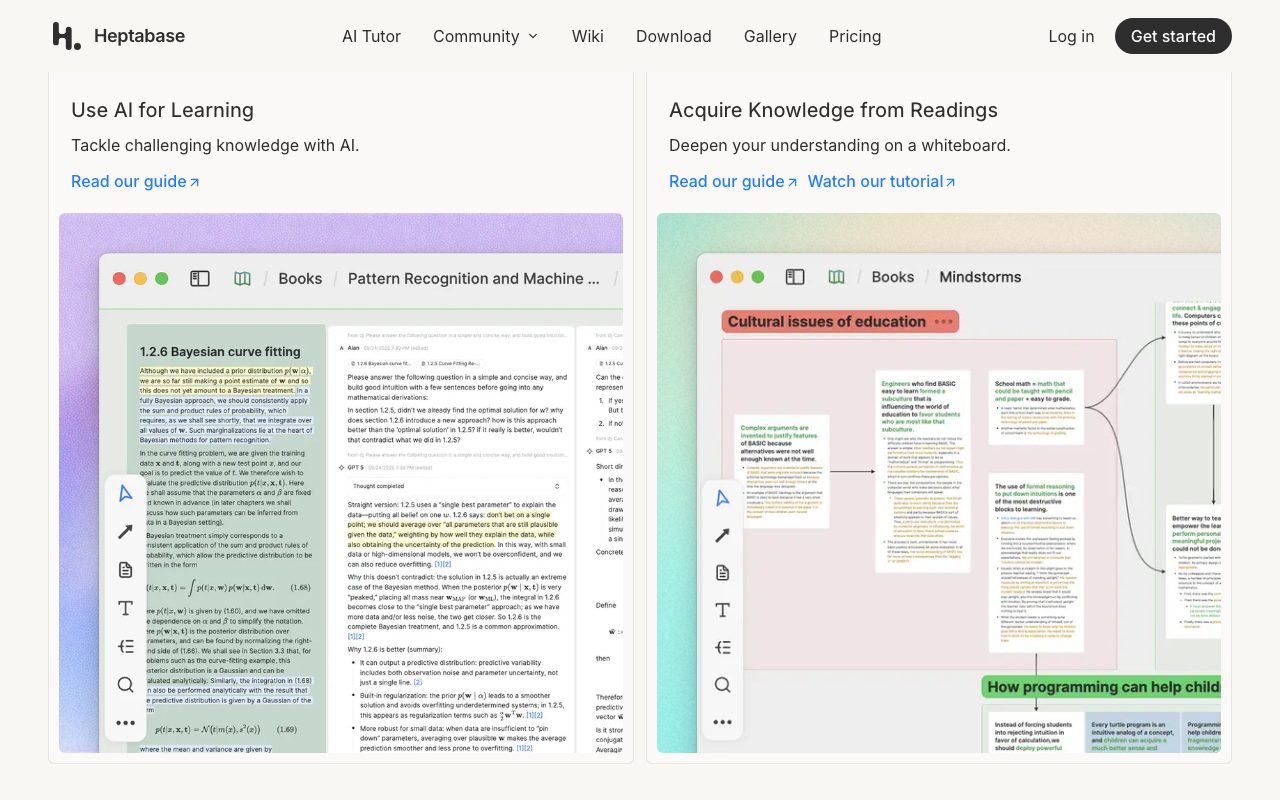
Around that core, Heptabase ships PDF annotation, journals, tags, sections, and a section-based outliner. You can study a textbook, write notes per page, surface key cards, and build a whiteboard that synthesizes the whole book. That workflow is genuinely different from anything else.
Cards on whiteboards
Cards are markdown notes. Whiteboards are infinite canvases. The interaction is fast on both desktop and iPad. Drag, link, group, color. The spatial dimension turns out to matter more than you'd expect.
Once you've built a few whiteboards on a topic you know well, you start seeing connections you missed. That's the pitch in action.
PDF reader and journal
Heptabase's PDF reader lets you highlight, annotate, and pull excerpts as cards. The journal is a daily note that links into the same card system. Together they handle the "input" side of thinking, with whiteboards handling the synthesis.
Heptabase is one of the few thinking tools where the workflow changes how you think. Most apps just hold notes. This one helps you make sense of them.
Who Heptabase is for
Researchers, students, writers, strategists, and anyone doing serious knowledge work that requires synthesis. PhDs use it to organize literature reviews. Founders use it to map markets. Teachers use it to build curricula.
It's overkill if you just need a notes app or a checklist. Heptabase shines when you have a lot of fragmented information that needs to connect. The learning curve is real, and the payoff scales with how much you put in.
Heptabase pricing
There's no free tier. Heptabase costs $11.99 a month or $99 a year billed annually. There's a 7-day free trial. No team plans yet (it's single-player by design).
The pricing puts off some users compared to Obsidian (free) or Notion ($10). The counter-argument is that Heptabase does something the free tools don't. If the workflow clicks, $99 a year is nothing for a tool you live in.
Features worth knowing
Whiteboards and sub-whiteboards
Boards can nest. A top-level whiteboard for "PhD" can contain sub-whiteboards for each chapter, each containing further synthesis boards. This nesting handles real-world complexity well.
Card linking and tags
Cards link bidirectionally. Tags work like Bear's. Together they let you find related work without manual filing. The graph view exists but isn't the focus.
PDF annotation pipeline
Highlight a PDF, the highlight becomes a card, the card lives on a whiteboard. That pipeline is the killer feature for academics.
Markdown export and offline
Notes are markdown. You can export the whole vault. Offline-first sync via local files. Owning your data is straightforward.
The tradeoffs
Heptabase is single-player. There's no real-time collab. For a team workshop, you'd use Miro or FigJam. Heptabase is for one person's thinking, not a group's.
The mobile experience trails the desktop. The iPad app is great. The phone app is okay. Heptabase isn't a "capture on the go" tool first. It's a "sit down and think" tool.
Heptabase vs alternatives
The honest comparisons are Heptabase vs Obsidian, Heptabase vs Roam, and Heptabase vs Scrintal. Obsidian is more flexible but text-only. Roam is graph-first. Scrintal is the closest direct competitor and ships similar card-on-canvas features.
Heptabase is the most polished card-on-canvas tool right now. See Heptabase alternatives or browse the best note-taking apps.
Bottom line on Heptabase
Heptabase is a thinking tool, not a notes tool. The distinction matters. If you mostly capture, you'll feel underutilized. If you regularly synthesize complex information, Heptabase becomes indispensable.
For researchers, deep readers, and strategists, Heptabase is the tool a lot of people wish they'd discovered earlier. The $99 a year is small if your work is thinking.
Common Heptabase questions
Is Heptabase worth $99 a year? For people doing serious knowledge work, yes. For casual note-takers, no. The cost makes sense if you spend hours weekly synthesizing complex information. If you mostly capture grocery lists, Apple Notes is fine.
How does Heptabase compare to Obsidian? Different tools. Obsidian is markdown notes with a graph and plugins. Heptabase is markdown notes plus infinite whiteboards. Obsidian is more flexible, Heptabase is more focused. Many users run both.
Does Heptabase work offline? Yes. The desktop app is local-first. Sync runs through Heptabase's cloud when you're online. You can work on a flight and sync when you land.
What's the iPad experience like?
The iPad app is excellent. Apple Pencil works for handwriting and sketching on whiteboards. The hybrid keyboard-plus-pencil workflow is genuinely powerful for thinking. Many Heptabase users do their best whiteboarding on iPad.
Can I use Heptabase as a Zettelkasten?
Sort of. The card-based model works for Zettelkasten if you tag and link consistently. The whiteboards become an additional layer for synthesis. Pure Zettelkasten purists usually prefer Obsidian or Roam, but Heptabase covers the same goals differently.
Workflow tips for Heptabase
Start with one project. Don't try to import all your notes. Pick one ongoing topic, build a whiteboard, get the workflow down. Expand from there.
Use the journal for daily capture. Daily notes link to cards. Cards live on whiteboards. The capture-then-synthesize flow is the whole point.
Resist over-organization. Heptabase rewards exploration over filing. Drop cards on whiteboards loosely. Patterns emerge as you arrange and rearrange. Premature structure kills this.
Export periodically. Heptabase's export gives you markdown files. Treat them as backup. Owning your data is a baseline expectation. Browse tools for researchers for adjacent picks.
Real-world Heptabase scenarios
A PhD student uses Heptabase for their literature review. PDFs go in. Highlights become cards. Cards get arranged on whiteboards by theme. Eventually the whiteboards become the structure of their dissertation chapters. Months of synthesis, not minutes.
A founder uses Heptabase for market research. Each interview becomes a card. Cards cluster by theme on a market-map whiteboard. Patterns emerge that wouldn't show up in a list of interview notes. The spatial arrangement does real cognitive work.
A consultant uses Heptabase for client engagements. One whiteboard per client, sub-whiteboards per project. Notes from meetings link to deliverables. The visual structure makes context-switching between clients faster. Less time getting back into the work.
How to learn Heptabase
Pick one ongoing topic. Don't import all your old notes. Just start with one project where you have actual synthesis to do.
Watch a few of the team's videos. Alan's walkthroughs of his own thinking process are genuinely useful. The model is non-obvious until you see it in action.
Don't over-organize early. Drop cards on whiteboards loosely. Move them as understanding deepens. Premature structure kills the value.
Use the journal daily. The habit of writing one journal entry per day plus tagging cards builds your knowledge base passively. Within a few months you have a real second brain. Browse the Heptabase page for community reviews.
Why Heptabase is different
Most note apps optimize for capture and search. Heptabase optimizes for synthesis. That's a meaningful philosophical difference. You can have all the world's notes in Notion and still not understand the topic. Heptabase helps you understand.
The card-on-canvas model isn't original; mind-mapping tools have done versions of this for decades. What Heptabase nails is the integration of cards with structured note-taking. Cards aren't just labels on a diagram; they're full markdown notes with backlinks. The synthesis layer connects to the writing layer.
For knowledge workers who routinely synthesize complex information (researchers, strategists, deep readers), this matters a lot. The visual rearrangement of ideas reveals connections that reading flat notes doesn't. The thinking happens in the tool, not despite it.
Heptabase is one of those tools where the workflow matters more than any single feature. Once you build a few whiteboards and feel the value, going back to flat notes feels limiting. That's the sign of a tool that's actually changing how you work, not just where you store things.
Heptabase's growth challenge
The hard part about Heptabase isn't the product, it's the audience. Most people don't synthesize information for a living. The card-on-canvas model offers diminishing returns to people who just take notes occasionally. Heptabase's market is real but not huge.
For the audience it serves, though, the loyalty is intense. Researchers and deep readers who try Heptabase tend to stay. The tool becomes part of how they think. Switching cost isn't just about exporting notes; it's about losing the workflow that helps them understand topics.
For founders evaluating thinking tools in 2026, Heptabase deserves a serious look if you do strategic synthesis often. If your work is mostly tactical execution, simpler tools fit better. The question is what kind of work you actually do, not what you wish you did.
Tutorial / Demo
Key Features
- Whiteboards composed of note cards
- Sub-whiteboards and nested topics
- Markdown editor with linking
- PDF reader with highlights to cards
- Tags, sections and journals
- Sync across desktop and mobile
Pros & Cons
What we like
- Spatial layout helps with research synthesis
- Cards reused across many whiteboards
- Strong PDF workflow for academics
- Active and thoughtful product team
Room for improvement
- No general personal free plan after the 7-day trial
- The collaboration-only free plan cannot access the full personal workspace
- The visual card and whiteboard model takes time to learn
- Premium AI tiers cost much more than the core Pro plan
Frequently Asked Questions
What is Heptabase used for?
Is Heptabase free?
How much does Heptabase cost?
Heptabase vs Obsidian, which is better?
Can I export my Heptabase notes?
Best For
Featured in
Alternatives to Heptabase

Excalidraw
Free hand-drawn whiteboard with collaboration and an embeddable editor

Bear
A beautiful Markdown notes app for Apple devices that doubles as a writing tool

Confluence
Atlassian's long-running team wiki that anchors many enterprise knowledge stacks

Slite
A focused team wiki that uses AI to keep your knowledge base actually trustworthy
Our take
Tool Index Editorial · May 2026· 4.5/5
What Heptabase is really selling — beyond the marketing copy — is a visual notes app where ideas live on whiteboards instead of in a sidebar.
On the strengths side: Spatial layout helps with research synthesis, Cards reused across many whiteboards, and Strong PDF workflow for academics. Honest gripes: No real free tier, only a trial and Power model takes time to internalize.
Recommendation: this is a strong default when you need academic literature reviews and theses. If no real free tier, only a trial would be a dealbreaker, the alternatives section below is worth a scroll.
Editorial opinion from the Tool Index team, written from the public product pages. Not a user review.
Reviews (2)
Pulled its weight from week one
Adopted Heptabase for one project, ended up using it for more. What stands out is how cards reused across many whiteboards. Mostly using it for mapping a complex problem visually. Would buy again without thinking twice.
Pros
- Strong PDF workflow for academics
- Active and thoughtful product team
- Spatial layout helps with research synthesis
Solid product, even better support
Heptabase isn't perfect but it's the best I've used in this category. What stands out is how cards reused across many whiteboards. Found it works best for academic literature reviews and theses. Would buy again without thinking twice.
Pros
- Cards reused across many whiteboards
Badge builder
Add Heptabase to your website
Choose a badge style and size, preview it here, then copy the generated HTML. Badge images are self-contained SVGs and do not require an external script.

<a href="https://toolindex.net/tools/heptabase?ref=badge" target="_blank" rel="noopener">
  <img src="https://toolindex.net/badge/heptabase/medium.svg" alt="Heptabase - Listed on Tool Index" width="180" height="50" />
</a>How to use the badge
- 1. Pick the style, size, and theme that fit your layout.
- 2. Copy the generated HTML from the code block.
- 3. Paste it into your footer, homepage, or press page.
Standard badge available
The standard listing badge is available now. Score and circle badges are limited to tools currently ranked in the top 10 of a category.
Badge clicks return visitors to this profile with a referral tag so the source remains identifiable.
Related Tools
Confluence
Atlassian's long-running team wiki that anchors many enterprise knowledge stacks
Asana
Project management for teams that live in projects, tasks and dependencies
Kevin Gabeci Toolkits
Seven AI toolkits for writing books, making music, cutting video, and building agents.

SoloDevStack
A solo developer blog built on head-to-head tool comparisons, 580+ posts deep.
Work on Heptabase? Request listing access or correction