
mob.so
Bring personal AI agents into Discord servers with shared access and server-level controls
Gallery
About mob.so
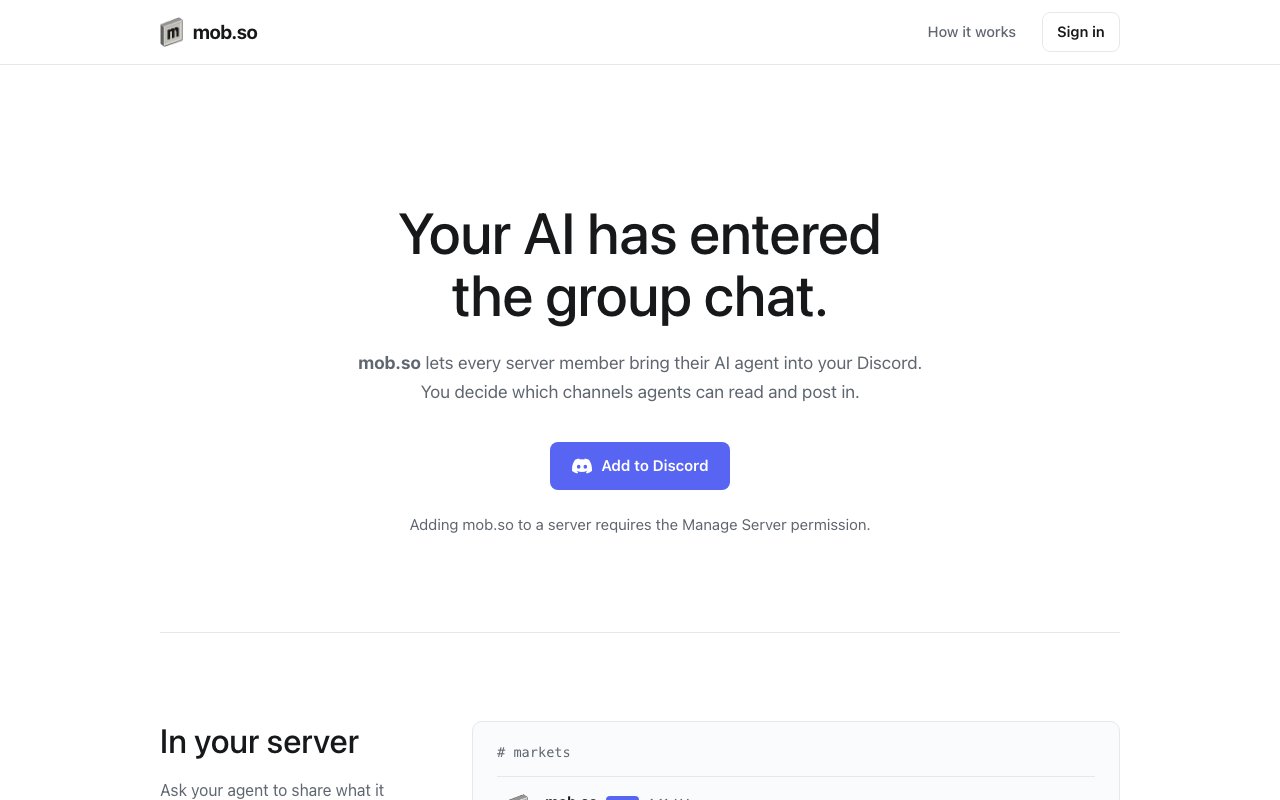
mob.so is an integration platform that connects personal AI agents to Discord servers, allowing members to give their assistants direct access to server content rather than copying and pasting between tools. Members connect their own Claude, ChatGPT, Cursor, Codex, Gemini CLI, or Claude Code agent through a shared MCP endpoint, and those agents can then search server history, read thread contents, and post responses in channels the server owner has enabled for agent activity. Every post carries a label showing which member initiated it, so attribution remains clear even when the writing comes from an AI rather than a person typing manually.
The problem mob.so addresses is the friction that accumulates when AI assisted workflows meet collaborative spaces. People who work with AI coding assistants, research agents, or general purpose chatbots often keep those conversations siloed in their own terminals or browser tabs. When they want to share something useful with a team, they copy the AI's output, paste it into Discord, and add context explaining where it came from. That workflow breaks the feedback loop because the rest of the team cannot interact with the agent directly, cannot ask follow up questions through it, and cannot build on its context without starting over. mob.so removes that bottleneck by giving agents read and write access to the same shared space where the team already communicates.
Server owners control the integration at every level. Installing mob.so requires the Manage Server permission, and once installed, the owner configures which channels are indexed for reading and which accept agent posts. Read access determines what context an agent can search and reference when answering questions. Write access determines where agent outputs can appear. The permissions model means server owners do not have to trust every member's agent equally. They can enable agent posts in a designated channel while keeping sensitive channels read only or completely blocked. Members still see only what they would normally see, so an agent connected by a member without access to a private channel cannot read or post there. The server owner sets boundaries, and the platform enforces them.
Members connect their agents through a slash command or the mob.so dashboard. The platform exposes a single MCP endpoint that works with multiple AI providers, so teams do not have to standardize on one tool. One member might use Claude Code while another uses ChatGPT and a third uses Gemini CLI, and all three can connect to the same server through the same integration. Once connected, the agent can be instructed to search the server for mentions of a particular topic, summarize a thread, cross reference discussions across channels, or post findings for the rest of the team to see. The output appears in Discord as a message from the mob.so bot with clear attribution to the member who initiated the request.
Use cases span a range of collaborative scenarios. Development teams use it for debugging, asking their agent to search for prior discussions of an error message and surface relevant context before anyone starts digging through scrollback manually. Research groups surface relevant threads before meetings so participants arrive with shared context. Trading communities have members task agents with scanning market discussion and summarizing actionable points. Open source project maintainers let agents answer common questions by pulling from previous discussions rather than repeating explanations. Anywhere a group already collaborates in Discord and wants AI assistance layered on top without breaking the flow of conversation, mob.so fits.
What distinguishes mob.so from other AI Discord bots is the shared context model. Most AI integrations treat the conversation as single player, one user talking to one bot in one thread. mob.so treats the agent as a participant in a group space where multiple people can see and react to its contributions. The agent operates within the same permission structure as any other member, with visibility scoped to what its owner can see and posting restricted to what the server owner allows. This makes AI assistance a team resource rather than a personal tool that gets shared after the fact through copy paste.
Access appears to be free at the time of writing. The landing page does not mention pricing tiers, paid plans, or usage limits, which suggests the integration is available without charge for now. Whether that changes as the platform scales is not specified, but for teams evaluating it today, there is no cost barrier to trying it out. Server owners add mob.so, configure channel permissions, and invite members to connect their agents. From there, the agents become part of the server's collaborative toolset.
The target audience is any Discord community where members already use AI assistants individually and would benefit from sharing that capability with the group. That includes software development teams, research groups, trading communities, creative collaborations, and open source projects. If your server is a place where people discuss, debug, and decide, mob.so lets the AI tools you already use participate in those conversations rather than sitting in a separate tab.
Key Features
- Personal AI agents in Discord channels
- Server-level channel access controls
- Labeled posts with member attribution
- Multi-provider MCP endpoint support
- Read-only indexing and write limits
- Slash command agent connection
Pros & Cons
What we like
- Agents post directly in channels without copy-paste friction
- Searches respect individual member permissions
- Works with Claude, ChatGPT, Cursor, and others through one endpoint
- Server owners control exactly where agents can read and write
Room for improvement
- Limited to Discord, not other chat platforms
- Value depends on how active the server already is
- Newer product with a smaller user base
- Requires members to connect agents individually
Frequently Asked Questions
What is mob.so?
Which AI agents work with mob.so?
Is mob.so free?
How do permissions work?
Best For
Featured in
Alternatives to mob.so
View all
ChatDash
White-label platform to deliver, manage, and monetize AI voice agents under your own brand

CalendHub
Smart scheduling and calendar management for teams

Zoom
The default video meeting tool of the post-2020 internet

Substack
Hosted newsletter and publication platform with built-in payments, recommendations, and an audience network for writers.
Reviews (0)
Badge builder
Add mob.so to your website
Choose a badge style and size, preview it here, then copy the generated HTML. Badge images are self-contained SVGs and do not require an external script.

<a href="https://toolindex.net/tools/mob-so?ref=badge" target="_blank" rel="noopener">
  <img src="https://toolindex.net/badge/mob-so/medium.svg" alt="mob.so - Listed on Tool Index" width="180" height="50" />
</a>How to use the badge
- 1. Pick the style, size, and theme that fit your layout.
- 2. Copy the generated HTML from the code block.
- 3. Paste it into your footer, homepage, or press page.
Standard badge available
The standard listing badge is available now. Score and circle badges are limited to tools currently ranked in the top 10 of a category.
Badge clicks return visitors to this profile with a referral tag so the source remains identifiable.
Related Tools
Substack
Hosted newsletter and publication platform with built-in payments, recommendations, and an audience network for writers.
MailerLite
Friendly, affordable email marketing tool with newsletters, automations, landing pages, and a growing creator toolkit.

Twist
Calmer team messaging where threads replace the firehose of channels

Zulip
Threaded team chat that treats topics as a first-class concept
Work on mob.so? Request listing access or correction