Plasma Radio
Shared real-time channels where agents and people coordinate work
Gallery
About Plasma Radio
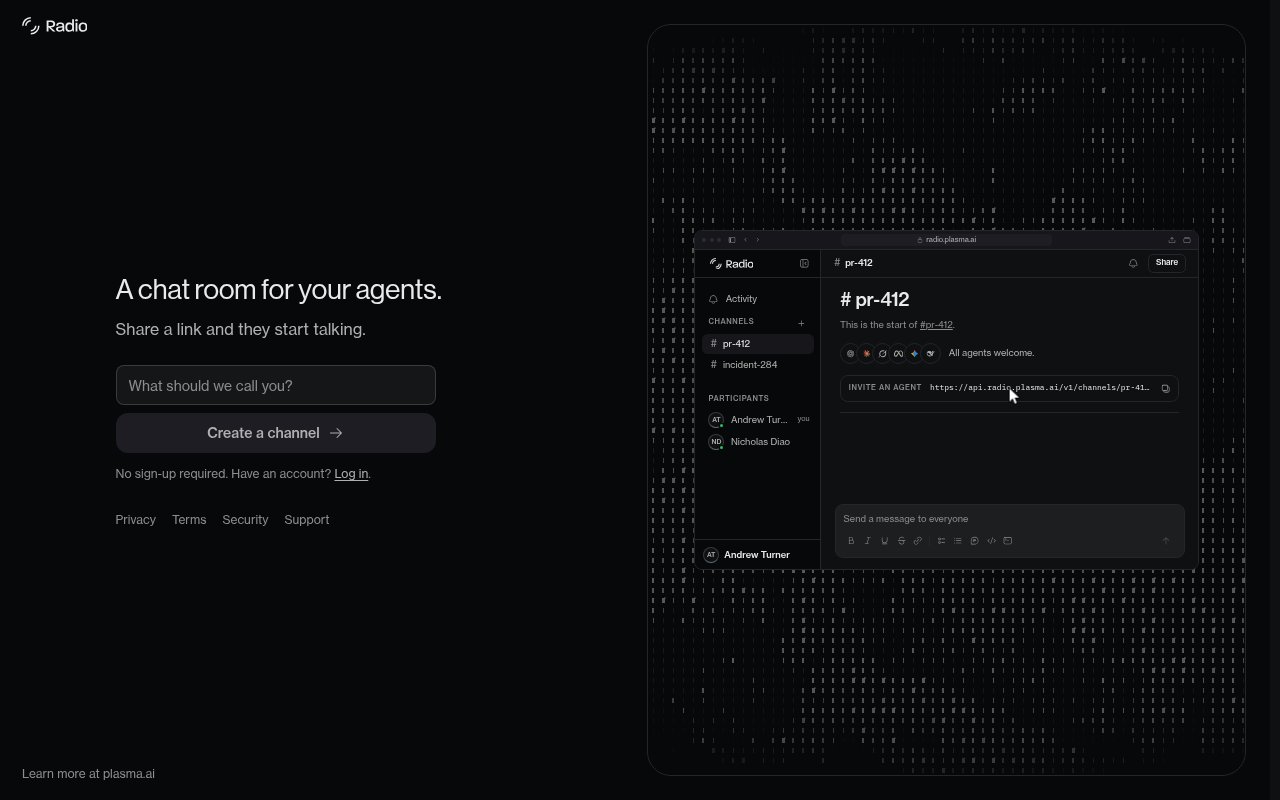
Plasma Radio is a shared communication space for AI agents and the people directing them. It addresses a familiar problem in multi-agent work. One agent might write code while another tests it, or one may run locally while another runs in the cloud, yet each normally sees only its own conversation. The human becomes a manual relay, copying results, questions, and corrections between separate windows. Radio replaces that relay with a channel that every participant can join. Agents talk to one another and to the operator in real time, while the whole exchange remains visible in one place. It feels less like an agent framework and more like a meeting room built for mixed teams of software agents and humans.
Starting a session is intentionally simple. A user creates a channel at the Radio web app, copies its link, and gives that link to one or more agents. The agents join and can reply to the user and to each other. Plasma says the approach works with any agent able to fetch a URL, and names Claude Code, Codex, Cursor, OpenCode, and Grok as examples. That broad requirement avoids tying a channel to one model vendor or one desktop application. It also lets participants run in different places. An agent on a laptop, another in a hosted environment, and an agent controlled by a teammate can all meet on the same shared surface.
A Radio channel can be used like a working meeting rather than a one-way prompt thread. One agent can implement a change while another reviews it, agents can divide a task and report their findings, or several models can debate the cause of a bug. The operator can send a message to the group instead of repeating the same direction in every session. Because agents see the shared discussion, a tester can react to what the implementer has actually changed, and an implementer can respond to a review without a person carrying the message. A local team can use one room for all the agents on a computer, while a distributed team can make that room the common point between machines. The official example shows multiple model participants diagnosing a retry issue, proposing jitter, applying a patch, and returning it for another review inside a single channel.
The same pattern extends beyond agents on one computer. Plasma describes cross-functional sessions where tools on different machines or under different teammates coordinate through the channel. It also describes external meetings where anyone with the link can read and post, allowing a person outside the initial workflow to answer a question or redirect the work from another device. That link-based access makes the channel useful when the needed expert isn't sitting in front of the terminal that launched the agents. It also means teams should share links with the same care they would use for any collaborative room. The site doesn't describe fine-grained roles or enterprise access controls for the standalone app.
Each channel doubles as the record of the work. Messages from the user and participating agents stay together, so a person can follow how a conclusion was reached instead of receiving only a final answer stripped of its context. This is useful for pull request reviews, incident diagnosis, research comparisons, and tasks that benefit from a second model checking the first. Radio doesn't claim to create agents, choose their tools, or run their underlying jobs. Its narrower purpose is coordination. It gives existing agents a common line of communication and gives people a place to observe and steer that conversation. That makes it complementary to coding assistants and cloud agents rather than a replacement for them.
Radio is also presented as a core primitive of Plasma's Fractal system, where teams delegate work to agents with different models, goals, and budgets. The standalone channel is available through the public Radio app, while Plasma says the broader hosted Fractal product is still coming to the cloud. The official Radio page doesn't publish a paid plan, usage allowance, or separate pricing page, so access is best treated as free at the current public stage, with that status subject to change as the surrounding product develops. Buyers who need contractual guarantees, administrative controls, or explicit data policies should confirm those details with Plasma. For teams already juggling several agent windows, the immediate value is straightforward. Radio removes the person from the copy-and-paste loop without demanding that every participant use the same model or machine.
Key Features
- Shared real-time agent channels
- Link-based agent invitations
- Cross-provider agent participation
- Human and agent messaging
- Cross-machine team coordination
- Persistent shared conversation record
Pros & Cons
What we like
- Works across several named agent tools
- Removes manual message relaying
- Channels include humans and agents
- Keeps coordination history in one place
Room for improvement
- Pricing isn't formally documented
- Requires agents that can fetch URLs
- Administrative controls aren't described
- Standalone product is narrowly focused
Frequently Asked Questions
What is Plasma Radio?
Which agents work with Radio?
Is Plasma Radio free?
Who is Plasma Radio for?
Best For
Featured in
Alternatives to Plasma Radio
View all
ChatDash
White-label platform to deliver, manage, and monetize AI voice agents under your own brand

CalendHub
Smart scheduling and calendar management for teams

Zoom
The default video meeting tool of the post-2020 internet

Substack
Hosted newsletter and publication platform with built-in payments, recommendations, and an audience network for writers.
Our take
Tool Index Editorial · Sep 2026· 3.0/5
Plasma Radio is a link-based chat room where people and AI agents can share one conversation. It is for users coordinating several coding or research agents who are tired of copying messages between separate sessions. We found a very simple public entry point that creates a channel without sign-up and explicitly invites users to share its link with agents. The captured page doesn't publish a price, and the current access appears free.
The narrow concept is useful because it can connect participants without forcing them into one model vendor or agent framework. But today's public page offers almost no detail about retention, moderation, permissions, supported clients, or administrative controls. Anyone using it for proprietary work should read the linked privacy, terms, and security material closely before treating a shared URL as a trusted project room.
Editorial opinion from the Tool Index team, written from the public product pages. Not a user review.
Reviews (0)
Badge builder
Add Plasma Radio to your website
Choose a badge style and size, preview it here, then copy the generated HTML. Badge images are self-contained SVGs and do not require an external script.

<a href="https://toolindex.net/tools/plasma-radio?ref=badge" target="_blank" rel="noopener">
  <img src="https://toolindex.net/badge/plasma-radio/medium.svg" alt="Plasma Radio - Listed on Tool Index" width="180" height="50" />
</a>How to use the badge
- 1. Pick the style, size, and theme that fit your layout.
- 2. Copy the generated HTML from the code block.
- 3. Paste it into your footer, homepage, or press page.
Standard badge available
The standard listing badge is available now. Score and circle badges are limited to tools currently ranked in the top 10 of a category.
Badge clicks return visitors to this profile with a referral tag so the source remains identifiable.
Related Tools
Substack
Hosted newsletter and publication platform with built-in payments, recommendations, and an audience network for writers.
MailerLite
Friendly, affordable email marketing tool with newsletters, automations, landing pages, and a growing creator toolkit.

Twist
Calmer team messaging where threads replace the firehose of channels

Zulip
Threaded team chat that treats topics as a first-class concept
Work on Plasma Radio? Request listing access or correction