Port Zero
Stable local domains for dev ports, eliminating conflicts and enabling cloud tunnels
Gallery
About Port Zero
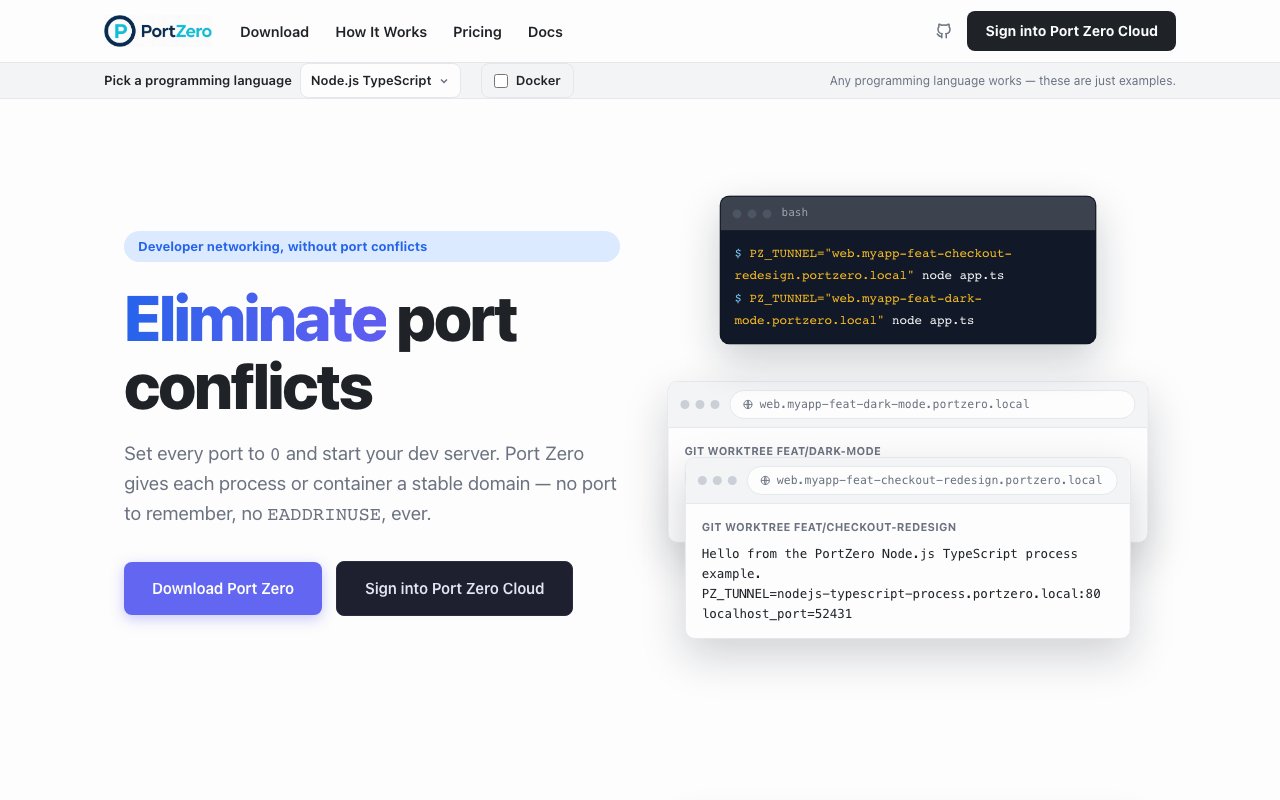
Port Zero eliminates port conflicts in local development environments by replacing manual port number management with stable, human-readable domain names that actually describe what they point to. The premise is straightforward: set your application ports to zero and let the tool handle everything else automatically. Instead of tracking which arbitrary port number maps to which project in a mental spreadsheet, or running into EADDRINUSE errors when multiple services fight over the same port during parallel development sessions, you get semantic domain names like web.myapp-feat-checkout.portzero.local that stay consistent across system restarts. The mental overhead of port juggling disappears entirely, replaced by URLs that communicate their purpose at a glance.
The local tunneling layer is completely free, open-source under the GNU GPL v3.0 license, and requires no registration or account creation to start using immediately. You install the tool on your development machine, set a PZ_TUNNEL environment variable specifying your desired domain name, run your application configured to bind to port zero, and Port Zero assigns an available port automatically while creating the domain mapping that routes traffic correctly. This pattern works across multiple programming languages and runtime environments including C#, Node.js, TypeScript, Python, Rust, and containerized applications running in Docker.
For developers working with git worktrees to run multiple feature branches simultaneously on the same machine, Port Zero eliminates what would otherwise be a coordination nightmare. Each branch gets its own self-explanatory URL without any manual port choreography or configuration file juggling. You can have your main branch running alongside three feature branches and a hotfix branch, each accessible via domain names that include the branch identifier, without ever thinking about which ports are free or remembering arbitrary numbers that mean nothing outside your current context.
Cloud tunnels extend the local development experience to remote access scenarios where you need to go beyond your own machine. When you need to share a development server with a colleague working remotely, test responsive behavior on a physical phone or tablet device, demo an in-progress feature branch to a client, or let QA access your local environment without deploying to a staging server, the paid tiers provide HTTPS-enabled tunnels that expose your local environment securely over the public internet. Visitor authentication and granular access controls let you decide exactly who can reach each tunnel, while integrated feedback comments allow collaborators to leave notes directly on live tunnels rather than filing issues in separate systems. The URLs maintain the same per-worktree structure, so feature-branch.yourproject.portzero.net points to exactly what the descriptive name suggests.
Teams building development workflows that incorporate AI coding agents will appreciate the Model Context Protocol integration that treats Port Zero as a native tool rather than an afterthought. Agents can access tunnels directly through the MCP interface, discovering available endpoints automatically and extracting production topology information from Docker compose files without requiring manual JSON configuration. This agent-native architecture reflects where development tooling is heading as automated coding assistance becomes more prevalent in professional workflows.
Pricing structures around flat monthly rates rather than per-seat charges, metered bandwidth, or surprise overage fees. The free tier covers unlimited local tunnels with all open-source features included, providing genuine value without artificial limitations designed purely to force upgrades. The Professional plan at forty-nine dollars monthly adds unlimited cloud tunnels with fair-use bandwidth allocation and collaborative feedback features for individual developers who need remote access capabilities. Teams pay one hundred forty-nine dollars monthly for shared subdomains, organization-wide access policies, naming conventions enforcement, cloud tunnel approval workflows, and consolidated billing, regardless of how many individual developers join the team over time. Enterprise pricing is available on a custom basis for organizations requiring audit logs, higher resource limits, and dedicated support.
What makes Port Zero compelling for modern development workflows is how naturally it scales from a single developer's laptop to distributed teams collaborating across multiple machines, time zones, and feature branches. You start completely free, eliminating an annoying friction point that's been part of local development since the beginning. If you later need to share environments remotely with teammates, involve larger teams without per-seat cost scaling, or give AI agents direct tunnel access for automated testing and deployment workflows, the upgrade path exists without rearchitecting anything about how your development environment works. The tool positions itself as infrastructure that matches how software development actually happens: parallel branch development, remote collaboration as the default, and increasingly, automated coding assistance integrated throughout the process.
Key Features
- Automatic port allocation via environment variable
- Stable local domains for dev processes
- Free local tunnels under GPL v3
- Public HTTPS cloud tunnels for sharing
- Team governance and approval workflows
- AI agent integration via MCP
Pros & Cons
What we like
- Eliminates port conflict errors without manual management
- Local domains stay consistent across restarts
- Free tier covers all local tunnel functionality
- Open source core with transparent licensing
Room for improvement
- Cloud tunnels require a paid subscription
- Adds a layer of indirection to local networking
- Younger product with a smaller community
- Team features priced for organizations, not individuals
Frequently Asked Questions
What is Port Zero?
Is Port Zero free?
Who is Port Zero for?
What platforms does Port Zero support?
Best For
Featured in
Alternatives to Port Zero
View allCursor
VS Code fork built around an AI pair-programmer

Sanity
Composable content platform with a customizable studio, real-time collaboration, and a queryable structured content backend.

PostHog
All-in-one product analytics, feature flags, and session replay
Cloudflare Pages
Free Jamstack hosting on Cloudflares edge with unlimited bandwidth and tight integration with Workers.
Our take
Tool Index Editorial · Oct 2026· 4.0/5
Port Zero replaces hand-assigned development ports with stable local domains, letting multiple processes, containers, or git worktrees bind to random available ports without collisions. The docs clearly explain the local daemon, scoped DNS, virtual addresses, TCP proxying, and separate cloud tunnel path. Local use is presented as free and open source, while internet sharing sits in the cloud offering.
We think this solves a real irritation with a notably coherent model, especially for teams running several branches at once. The cost is another background daemon, a local certificate authority for trusted HTTPS, and networking behavior that developers must understand when debugging. Exact cloud pricing was not visible in our captured excerpt, but the local path is concrete enough to evaluate on its own.
Editorial opinion from the Tool Index team, written from the public product pages. Not a user review.
Reviews (0)
Badge builder
Add Port Zero to your website
Choose a badge style and size, preview it here, then copy the generated HTML. Badge images are self-contained SVGs and do not require an external script.

<a href="https://toolindex.net/tools/port-zero?ref=badge" target="_blank" rel="noopener">
  <img src="https://toolindex.net/badge/port-zero/medium.svg" alt="Port Zero - Listed on Tool Index" width="180" height="50" />
</a>How to use the badge
- 1. Pick the style, size, and theme that fit your layout.
- 2. Copy the generated HTML from the code block.
- 3. Paste it into your footer, homepage, or press page.
Standard badge available
The standard listing badge is available now. Score and circle badges are limited to tools currently ranked in the top 10 of a category.
Badge clicks return visitors to this profile with a referral tag so the source remains identifiable.
Related Tools

Kevin Gabeci
Solo developer building web apps, cozy browser games, and AI creator toolkits.

Coolify
Self-hostable, open source alternative to Heroku and Netlify

Warp
The modern terminal reimagined with AI and collaboration

Bolt.new
Prompt-to-deployed full-stack app inside the browser
Work on Port Zero? Request listing access or correction