
ClientCoded
Test and monitor conversational and data agents with adversarial scenarios and scored results
Gallery
About ClientCoded
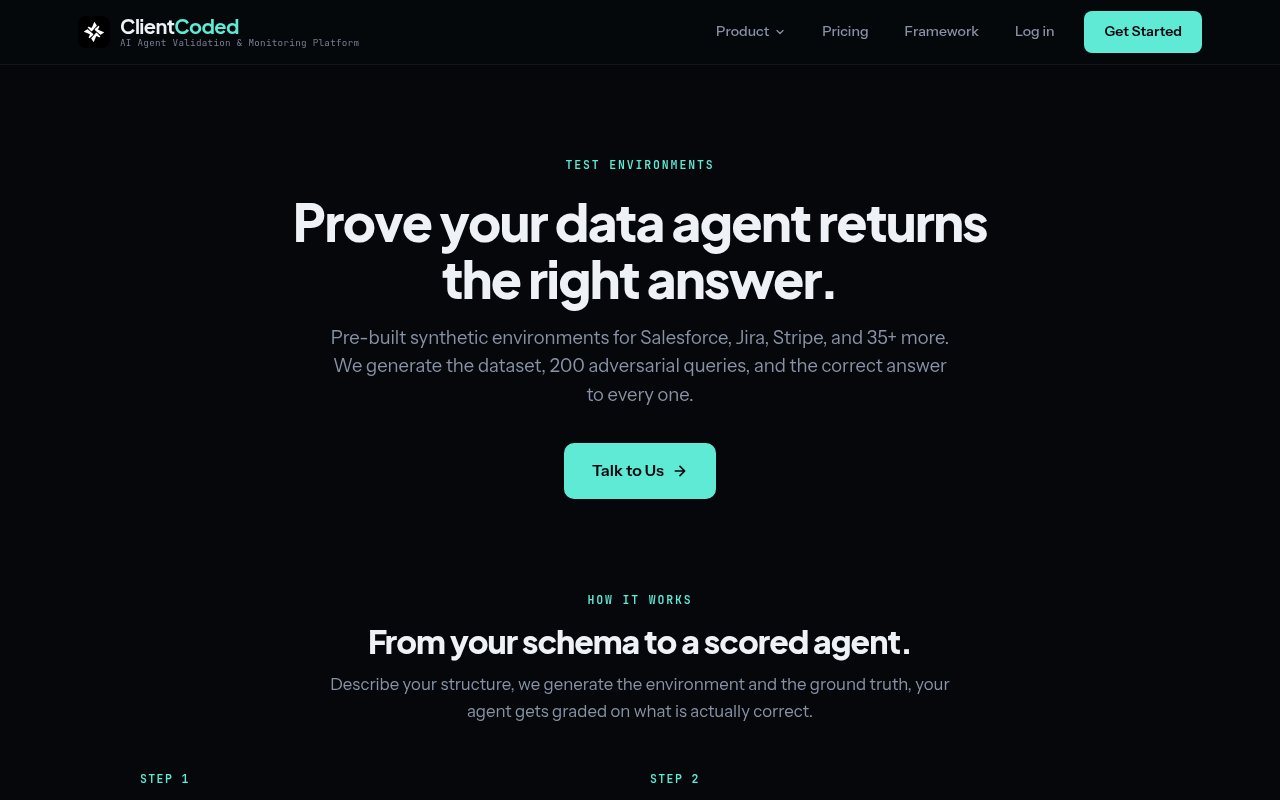
ClientCoded is a validation and production monitoring platform for AI agents. It helps teams find conversations and data questions their agents handle badly, then turns those failures into scores, reports, and alerts that can be acted on. The platform covers agents that talk to people, including support bots, AI sales representatives, lead qualifiers, email agents, and onboarding bots. It also covers agents that answer from business systems such as CRM, ticketing, knowledge, finance, and developer tools. The common goal is to measure whether an agent actually completed its job, not merely whether its response sounded fluent.
For conversational agents, ClientCoded generates synthetic users with adversarial behaviors and runs real multi-turn conversations against the live agent. Those personas can object, contradict earlier statements, go off topic, show strong buying intent, or otherwise move outside the happy path a team expected. Each conversation receives an outcome result and dimension scores based on a published quality framework. The framework separates whether the agent succeeded from how it behaved, with checks that include information accuracy, tone calibration, context retention, guardrail compliance, repetition, escalation, and role-specific criteria. Teams can inspect the transcript and see which part of the exchange caused a failure.
Data and knowledge agents use a different testing method because many of their questions have a correct factual answer. A team can connect a staging database or describe its schema without sending real records. ClientCoded generates synthetic data that follows that structure, creates 200 questions across seven adversarial categories, and computes the ground truth because it created the dataset. The categories include clean, ambiguous, multi-step, scope-boundary, contradictory, invalid-assumption, and context-dependent questions. The resulting report compares the agent's answer with the known result and identifies exactly which queries failed.
The environments page lists 40 ready-made synthetic environments across common systems. They cover CRM products such as Salesforce and HubSpot, ticketing tools such as Jira and Linear, communication systems including Slack and Intercom, knowledge sources including Notion and Google Drive, developer platforms such as GitHub and Datadog, and finance, support, commerce, HR, analytics, and security applications. Each environment ships with a synthetic dataset, 200 adversarial queries, and computed ground truth. Custom environments can be generated from a team's own schema when the pre-built set doesn't resemble the system an agent needs to query.
The output is designed to show more than a single grade. A scored data-agent run includes answer correctness and conversation quality, along with the exact questions the agent got wrong. Full reports add per-question transcripts and failure-type distribution, so an engineer can move from an overall score to the query and reasoning pattern behind it. Since the dataset and expected result are generated together, the team doesn't have to hand-author an answer for every synthetic question. That distinction is useful for multi-step or contradictory requests where a confident but incorrect response might otherwise pass a superficial review.
Production monitoring extends the same quality focus beyond scheduled testing. A team sends agent conversations to one webhook, and ClientCoded scores them using rule-based checks for obvious failures and an LLM judge for subtler problems such as wrong information, poor tone, or missed escalation. Quality changes appear in a dashboard, and Slack alerts notify the team when a threshold is breached. The service can also detect changes, retest an agent, and flag regressions after a prompt or behavior shifts. An optional SDK adds internal tool-call visibility, while the basic monitoring connection doesn't require an SDK.
ClientCoded is best suited to teams that already operate a customer-facing, internal, or data-connected agent and need repeatable quality assurance. It isn't a framework for building the agent itself, and meaningful results depend on connecting the agent or supplying its schema. Pricing starts with the Observe plan at $49 per month for one agent, one user, and up to 10,000 monitored messages. Team costs $599 per month for five agents, scheduled and on-demand tests, change detection, custom personas and success criteria, alerts, and five users. Enterprise pricing is custom and adds unlimited agents, custom test volume, CI/CD smoke tests, synthetic environments, custom rubrics, onboarding, and review. There is a free browser benchmark with no account required, but the operational platform is paid.
Key Features
- Adversarial multi-turn agent testing
- Synthetic data test environments
- Computed ground-truth answers
- Published quality scoring framework
- Real-time production monitoring
- Slack regression alerts
Pros & Cons
What we like
- Tests conversational and data agents with appropriate methods
- Synthetic environments keep real records out of testing
- Per-question results make failures easier to investigate
- Webhook setup supports monitoring without a required SDK
Room for improvement
- Operational plans start at $49 per month
- Team testing jumps to a much higher monthly price
- Requires an existing agent or schema to provide value
- Generated scenarios still need team review
Frequently Asked Questions
What is ClientCoded?
Does ClientCoded need real customer data?
How does ClientCoded monitor an agent?
How much does ClientCoded cost?
Best For
Featured in
Alternatives to ClientCoded
View all
Playwright
Microsofts open-source end-to-end browser testing framework for Chromium, Firefox, and WebKit with one API.
Selenium Boot
Java testing framework that brings Spring Boot conventions and Playwright APIs to Selenium
Buildkite
Hybrid CI/CD where the control plane is hosted but the build agents run on your own infrastructure.

Storybook
Open-source workshop for building UI components in isolation. Preview, document, and test them outside the app.
Our take
Tool Index Editorial · Sep 2026· 3.5/5
ClientCoded tests conversational and data agents against synthetic environments, adversarial questions, and computed ground truth, then monitors production conversations for regressions. It is aimed at teams that already have an agent and need repeatable quality evidence. Starter is $49 per month for one agent and a limited monthly test, while Team jumps to $599 per month for five agents, scheduled tests, and monitoring.
We like that the test data can mirror a schema without copying real records and that each prebuilt environment includes 200 questions with known answers. A webhook path also lowers integration work. The pricing gap is steep, and generated scenarios still need domain review before their scores mean much. Small teams may outgrow Starter well before they can justify Team, especially if they need frequent full regression runs.
Editorial opinion from the Tool Index team, written from the public product pages. Not a user review.
Reviews (0)
Badge builder
Add ClientCoded to your website
Choose a badge style and size, preview it here, then copy the generated HTML. Badge images are self-contained SVGs and do not require an external script.

<a href="https://toolindex.net/tools/clientcoded?ref=badge" target="_blank" rel="noopener">
  <img src="https://toolindex.net/badge/clientcoded/medium.svg" alt="ClientCoded - Listed on Tool Index" width="180" height="50" />
</a>How to use the badge
- 1. Pick the style, size, and theme that fit your layout.
- 2. Copy the generated HTML from the code block.
- 3. Paste it into your footer, homepage, or press page.
Standard badge available
The standard listing badge is available now. Score and circle badges are limited to tools currently ranked in the top 10 of a category.
Badge clicks return visitors to this profile with a referral tag so the source remains identifiable.
Related Tools

DeviceKit
Free Screen & Device Tests Online | Private Browser Diagnostics

Chromatic
Visual regression testing and review platform built by the Storybook team, with cloud-rendered snapshots and PR integration.
Playwright
Microsofts open-source end-to-end browser testing framework for Chromium, Firefox, and WebKit with one API.

Tests.ws
WebSocket testing tools, protocol guides, and a Chrome extension for developers
Work on ClientCoded? Request listing access or correction