
Free WCAG Accessibility Checker
Scan up to 10 website pages for WCAG accessibility issues without signing up
Gallery
About Free WCAG Accessibility Checker
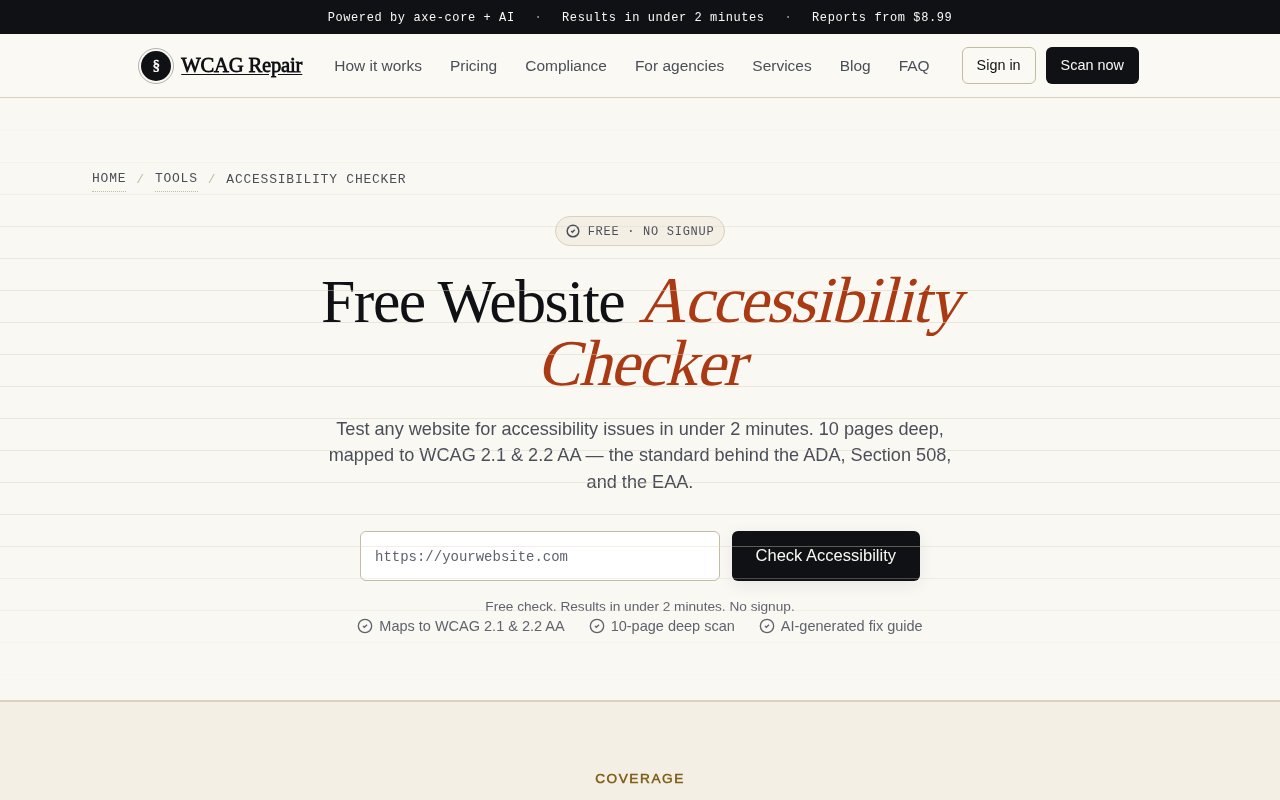
Free WCAG Accessibility Checker is a browser-based site scanner from WCAG Repair that looks for common accessibility problems across as many as ten pages. A user enters a public website URL, and the service crawls the site with a headless browser, runs automated checks on each page, and returns results organized by severity. There is no extension or local setup, and the dedicated checker page says the scan can be run without signing up. It is meant to give site owners, developers, marketers, and agencies a quick first view of issues that may affect people using keyboards, screen readers, magnification, or other assistive technology.
The scanner uses axe-core and maps its results to more than 60 WCAG 2.1 and 2.2 Level A and AA rules, with about 90 automated checks when best practices are included. Its coverage includes missing or empty alternative text, insufficient text and interface contrast, form controls without associated labels, keyboard and focus problems, invalid ARIA roles or references, unlabeled buttons and links, heading structure, landmarks, page language, and link purpose. Because it loads pages in a real browser environment, it can inspect rendered markup rather than only downloading source files. The ten-page crawl also gives a broader sample than a checker that evaluates only the URL entered. Results arrive in under two minutes according to the product page, although crawl time can reasonably depend on the target site's size and responsiveness.
Free results show an issue count, severity breakdown, and a preview of important findings. Users who need implementation guidance can buy an AI-generated remediation guide. That report adds page-by-page findings, links issues to the relevant WCAG criteria, proposes before and after code, prioritizes fixes by impact, includes platform-specific instructions, and estimates the effort for each item. It can be downloaded as a PDF and delivered by email. A separate complete site audit combines the accessibility report with checks for SSL, DNS, security headers, performance, and AI readiness, while higher tiers expand the crawl to 25 or 100 pages and add items such as a certificate, badge, rescans, or priority support.
The tool is useful early in a redesign, before a launch, during a compliance review, or when an agency needs a fast baseline for a prospective client. Developers can use the findings to locate missing labels, contrast failures, broken semantics, and keyboard barriers before arranging a deeper manual review. Content teams can catch common publishing mistakes across a small marketing site. Business owners without an accessibility specialist can get a prioritized list instead of reading the WCAG standard from the beginning. Monthly monitoring is also available after an initial report purchase, with automated rescans, progress tracking, new issue alerts, and report credits for sites that change regularly. WCAG Repair also provides separate free tools for checking an individual color pair and generating an accessibility statement.
WCAG Repair is direct about the limit of automated testing. A scanner can reliably catch many machine-detectable failures, but it cannot decide whether alternative text communicates the right meaning, whether a reading order is logical, whether instructions are understandable, or whether a complete task works well with assistive technology. Passing an automated scan therefore isn't the same as proving full WCAG conformance or legal compliance. The product's remediation guide flags findings that need manual judgment, but teams with higher risk or complex applications should still test with keyboards and screen readers, involve disabled users where possible, and obtain qualified professional advice for legal obligations.
The pricing model is freemium. The ten-page scan starts at $0 with no credit card, while the AI remediation guide is listed as a one-time $8.99 purchase. A broader site health and security bundle is $29, monthly monitoring is $7 after an initial report, a 25-page Pro scan is $79, and a 100-page Business scan is $199. Agency subscriptions are listed separately for teams that need multiple sites, shared dashboards, or white-label reports. This makes the free checker easy to try and useful for triage, while the most actionable code guidance and ongoing tracking sit behind modest paid options. Its strongest fit is a small or medium public site that needs a quick automated baseline, not a replacement for a full accessibility practice.
Key Features
- Ten-page headless browser scan
- WCAG 2.1 and 2.2 mapping
- Axe-core automated testing
- Severity-based issue breakdown
- Optional AI remediation guide
- Paid monitoring and rescans
Pros & Cons
What we like
- Scans several pages without local setup
- Uses a widely adopted testing engine
- Covers common content and interface failures
- Offers specific paid code fix guidance
Room for improvement
- Automated checks cannot prove full conformance
- Free scans cover only ten pages
- Detailed remediation guidance requires payment
- Public URLs are needed for cloud scanning
Frequently Asked Questions
What does the accessibility checker test?
Is the WCAG accessibility checker free?
Can an automated scan prove WCAG compliance?
What is included in the paid remediation guide?
Best For
Featured in
Alternatives to Free WCAG Accessibility Checker
Playwright
Microsofts open-source end-to-end browser testing framework for Chromium, Firefox, and WebKit with one API.
Selenium Boot
Java testing framework that brings Spring Boot conventions and Playwright APIs to Selenium

Buildkite
Hybrid CI/CD where the control plane is hosted but the build agents run on your own infrastructure.

Storybook
Open-source workshop for building UI components in isolation. Preview, document, and test them outside the app.
Our take
Tool Index Editorial · Oct 2026· 3.5/5
Free WCAG Accessibility Checker runs axe-core against as many as ten public pages and organizes machine-detectable WCAG 2.1 and 2.2 issues by severity. We like that it needs no signup and checks more than a single URL, which can expose a broken template across a small site. The free result previews the top three issues, while a detailed remediation PDF costs $8.99.
Its name is broader than its proof. Automated checks can find contrast, labeling, ARIA, and structural faults, but they cannot establish full conformance or judge whether an experience works with a keyboard or screen reader. The free report is also a preview, not a complete repair plan. It is a good first pass for site owners and developers, provided manual testing follows.
Editorial opinion from the Tool Index team, written from the public product pages. Not a user review.
Reviews (0)
No reviews yet
Be the first to share your experience with Free WCAG Accessibility Checker
Sign in to write a reviewBadge builder
Add Free WCAG Accessibility Checker to your website
Choose a badge style and size, preview it here, then copy the generated HTML. Badge images are self-contained SVGs and do not require an external script.

<a href="https://toolindex.net/tools/free-wcag-accessibility-checker?ref=badge" target="_blank" rel="noopener">
  <img src="https://toolindex.net/badge/free-wcag-accessibility-checker/medium.svg" alt="Free WCAG Accessibility Checker - Listed on Tool Index" width="180" height="50" />
</a>How to use the badge
- 1. Pick the style, size, and theme that fit your layout.
- 2. Copy the generated HTML from the code block.
- 3. Paste it into your footer, homepage, or press page.
Standard badge available
The standard listing badge is available now. Score and circle badges are limited to tools currently ranked in the top 10 of a category.
Badge clicks return visitors to this profile with a referral tag so the source remains identifiable.
Related Tools
DeviceKit
Free Screen & Device Tests Online | Private Browser Diagnostics

Chromatic
Visual regression testing and review platform built by the Storybook team, with cloud-rendered snapshots and PR integration.
Playwright
Microsofts open-source end-to-end browser testing framework for Chromium, Firefox, and WebKit with one API.

Tests.ws
WebSocket testing tools, protocol guides, and a Chrome extension for developers
Work on Free WCAG Accessibility Checker? Request listing access or correction